
ES6, also called ECMAScript 2015, is a major update to JavaScript that introduced many useful features to make coding easier, cleaner, and more powerful.
Some ES6 features I regularly use:
1. `let` and `const` – for better variable declaration instead of `var`. `const` for constant values, `let` for block-scoped variables.
2. Arrow functions – shorter syntax for writing functions and keeping `this` context.
3. Template literals (`\`\$\`\`) – for creating strings with variables easily using backticks.
4. Destructuring – to extract values from arrays or objects directly.
5. Spread (`...`) and Rest operators – for copying arrays/objects or handling function arguments.
6. Default parameters – to set default values in functions.
7. Modules (import/export) – to organize code into separate reusable files.
8. Promises – for handling asynchronous operations more cleanly.
9. Classes – for object-oriented programming, replacing constructor functions.
ES6, যাকে ECMAScript 2015 ও বলা হয়, এটি JavaScript-এর একটি বড় আপডেট। এতে অনেক নতুন ফিচার এসেছে যা কোড লেখা সহজ, পরিষ্কার এবং শক্তিশালী করেছে।
আমি যেসব ES6 ফিচার নিয়মিত ব্যবহার করি:
1. `let` এবং `const` – আগে `var` ব্যবহার করতাম, এখন ব্লক-স্কোপ এবং কনস্ট্যান্ট ভ্যালু রাখার জন্য `let` ও `const` ব্যবহার করি।
2. Arrow Function – ছোট ও পরিষ্কার ফাংশন লেখার জন্য, এবং `this` ঠিক রাখে।
3. Template Literals (`\`\$\`\`) – ব্যাকটিক ব্যবহার করে স্ট্রিং এ ভেরিয়েবল সহজে বসানো যায়।
4. Destructuring – অবজেক্ট বা অ্যারে থেকে সরাসরি মান বের করতে ব্যবহার করি।
5. Spread ও Rest Operator (`...`) – অ্যারে বা অবজেক্ট কপি, এবং ফাংশনের অনেক আর্গুমেন্ট ধরতে ব্যবহার করি।
6. Default Parameters – ফাংশনে ডিফল্ট ভ্যালু সেট করার জন্য।
7. Modules (import/export) – বড় প্রজেক্টে কোড আলাদা আলাদা ফাইলে ভাগ করার জন্য ব্যবহার করি।
8. Promises – অ্যাসিনক্রোনাস কাজ সহজভাবে হ্যান্ডেল করতে ব্যবহার করি।
9. Classes – অবজেক্ট-ওরিয়েন্টেড প্রোগ্রামিং এর জন্য `class` ব্যবহার করি।
Some ES6 features I regularly use:
1. `let` and `const` – for better variable declaration instead of `var`. `const` for constant values, `let` for block-scoped variables.
2. Arrow functions – shorter syntax for writing functions and keeping `this` context.
3. Template literals (`\`\$\`\`) – for creating strings with variables easily using backticks.
4. Destructuring – to extract values from arrays or objects directly.
5. Spread (`...`) and Rest operators – for copying arrays/objects or handling function arguments.
6. Default parameters – to set default values in functions.
7. Modules (import/export) – to organize code into separate reusable files.
8. Promises – for handling asynchronous operations more cleanly.
9. Classes – for object-oriented programming, replacing constructor functions.
ES6, যাকে ECMAScript 2015 ও বলা হয়, এটি JavaScript-এর একটি বড় আপডেট। এতে অনেক নতুন ফিচার এসেছে যা কোড লেখা সহজ, পরিষ্কার এবং শক্তিশালী করেছে।
আমি যেসব ES6 ফিচার নিয়মিত ব্যবহার করি:
1. `let` এবং `const` – আগে `var` ব্যবহার করতাম, এখন ব্লক-স্কোপ এবং কনস্ট্যান্ট ভ্যালু রাখার জন্য `let` ও `const` ব্যবহার করি।
2. Arrow Function – ছোট ও পরিষ্কার ফাংশন লেখার জন্য, এবং `this` ঠিক রাখে।
3. Template Literals (`\`\$\`\`) – ব্যাকটিক ব্যবহার করে স্ট্রিং এ ভেরিয়েবল সহজে বসানো যায়।
4. Destructuring – অবজেক্ট বা অ্যারে থেকে সরাসরি মান বের করতে ব্যবহার করি।
5. Spread ও Rest Operator (`...`) – অ্যারে বা অবজেক্ট কপি, এবং ফাংশনের অনেক আর্গুমেন্ট ধরতে ব্যবহার করি।
6. Default Parameters – ফাংশনে ডিফল্ট ভ্যালু সেট করার জন্য।
7. Modules (import/export) – বড় প্রজেক্টে কোড আলাদা আলাদা ফাইলে ভাগ করার জন্য ব্যবহার করি।
8. Promises – অ্যাসিনক্রোনাস কাজ সহজভাবে হ্যান্ডেল করতে ব্যবহার করি।
9. Classes – অবজেক্ট-ওরিয়েন্টেড প্রোগ্রামিং এর জন্য `class` ব্যবহার করি।
In JavaScript, `var`, `let`, and `const` are used to declare variables, but they work differently.
* First, `var` is function-scoped, which means it's accessible throughout the function where it's declared. It also gets hoisted, but initialized as `undefined`. It's also re-declarable, which can cause bugs. That’s why we usually avoid using `var` in modern JavaScript.
* `let` is block-scoped, meaning it only exists inside the block `` where it is declared. It also gets hoisted but is not initialized, so using it before declaration causes an error. Unlike `var`, `let` can’t be re-declared in the same scope, but it can be reassigned, so it's useful for variables that change.
* `const` is also block-scoped, but once you assign a value, it cannot be reassigned. It’s ideal for constants or fixed values. However, for objects and arrays, the reference stays constant, but internal values can change.
In short: I use `let` when I expect the value to change, and `const` when the value should remain fixed. I avoid `var` completely in my codebase.
JavaScript-এ `var`, `let`, আর `const` তিনটিই ভেরিয়েবল ডিক্লেয়ার করার জন্য ব্যবহার হয়, কিন্তু এদের আচরণ আলাদা।
* প্রথমত, `var` ফাংশন স্কোপড, মানে এটি পুরো ফাংশনের মধ্যে অ্যাক্সেসযোগ্য। এটি hoist হয় এবং `undefined` হিসেবে initialize হয়। আবার একই স্কোপে পুনরায় ডিক্লেয়ার করা যায়, যেটা অনেক সময় ভুলের কারণ হয়। তাই আমি `var` ব্যবহার এড়িয়ে চলি।
* `let` ব্লক স্কোপড, মানে এটি যেই `` ব্লকের ভিতরে আছে, শুধু সেখানে অ্যাক্সেস করা যায়। এটাও hoist হয়, কিন্তু initialize হয় না—তাই ডিক্লেয়ারেশনের আগে ব্যবহার করলে error হয়। এটা re-declare করা যায় না, তবে reassign করা যায়, মানে মান পরিবর্তন করা যায়।
* `const` ব্লক স্কোপড, কিন্তু একবার মান সেট করলে পরে আর সেটি পরিবর্তন করা যায় না। এটি আমি ব্যবহার করি যখন আমি জানি মান কখনও বদলাবে না। তবে যদি `const` দিয়ে object বা array ডিক্লেয়ার করি, তাহলে সেই object বা array এর ভিতরের ভ্যালু পরিবর্তন করা যায়, কিন্তু reference পরিবর্তন করা যায় না।
সংক্ষেপে বললে: আমি `let` ব্যবহার করি যেসব ভেরিয়েবলের মান পরিবর্তন হতে পারে, এবং `const` ব্যবহার করি যেগুলো ফিক্সড থাকে। `var` আমি ব্যবহার করি না।
* First, `var` is function-scoped, which means it's accessible throughout the function where it's declared. It also gets hoisted, but initialized as `undefined`. It's also re-declarable, which can cause bugs. That’s why we usually avoid using `var` in modern JavaScript.
* `let` is block-scoped, meaning it only exists inside the block `` where it is declared. It also gets hoisted but is not initialized, so using it before declaration causes an error. Unlike `var`, `let` can’t be re-declared in the same scope, but it can be reassigned, so it's useful for variables that change.
* `const` is also block-scoped, but once you assign a value, it cannot be reassigned. It’s ideal for constants or fixed values. However, for objects and arrays, the reference stays constant, but internal values can change.
In short: I use `let` when I expect the value to change, and `const` when the value should remain fixed. I avoid `var` completely in my codebase.
JavaScript-এ `var`, `let`, আর `const` তিনটিই ভেরিয়েবল ডিক্লেয়ার করার জন্য ব্যবহার হয়, কিন্তু এদের আচরণ আলাদা।
* প্রথমত, `var` ফাংশন স্কোপড, মানে এটি পুরো ফাংশনের মধ্যে অ্যাক্সেসযোগ্য। এটি hoist হয় এবং `undefined` হিসেবে initialize হয়। আবার একই স্কোপে পুনরায় ডিক্লেয়ার করা যায়, যেটা অনেক সময় ভুলের কারণ হয়। তাই আমি `var` ব্যবহার এড়িয়ে চলি।
* `let` ব্লক স্কোপড, মানে এটি যেই `` ব্লকের ভিতরে আছে, শুধু সেখানে অ্যাক্সেস করা যায়। এটাও hoist হয়, কিন্তু initialize হয় না—তাই ডিক্লেয়ারেশনের আগে ব্যবহার করলে error হয়। এটা re-declare করা যায় না, তবে reassign করা যায়, মানে মান পরিবর্তন করা যায়।
* `const` ব্লক স্কোপড, কিন্তু একবার মান সেট করলে পরে আর সেটি পরিবর্তন করা যায় না। এটি আমি ব্যবহার করি যখন আমি জানি মান কখনও বদলাবে না। তবে যদি `const` দিয়ে object বা array ডিক্লেয়ার করি, তাহলে সেই object বা array এর ভিতরের ভ্যালু পরিবর্তন করা যায়, কিন্তু reference পরিবর্তন করা যায় না।
সংক্ষেপে বললে: আমি `let` ব্যবহার করি যেসব ভেরিয়েবলের মান পরিবর্তন হতে পারে, এবং `const` ব্যবহার করি যেগুলো ফিক্সড থাকে। `var` আমি ব্যবহার করি না।
I use default parameters in JavaScript to handle situations where a function might be called without passing all the arguments.
If a parameter is not provided, the default value will be used automatically, which helps avoid undefined errors and makes the code more reliable and readable.
In short, default parameters make functions more flexible and safer to use, especially when working with optional arguments or API calls.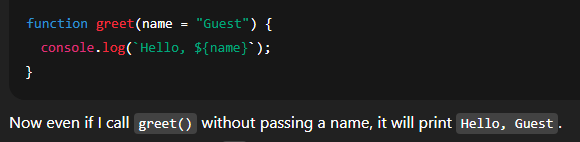 আমি default parameters ব্যবহার করি তখন, যখন কোনো ফাংশনে সব আর্গুমেন্ট না আসলেও যেন ফাংশন ঠিকভাবে কাজ করে।
যদি কোনো প্যারামিটার না দেওয়া হয়, তাহলে default value অটোমেটিকভাবে নেয়। এতে করে undefined error থেকে রক্ষা পাওয়া যায় এবং কোডটা আরও রিডেবল ও রিলায়েবল হয়।
সংক্ষেপে, default parameters কোডকে করে সহজ, নিরাপদ, এবং optional arguments ব্যবহারে খুব উপকারি।
If a parameter is not provided, the default value will be used automatically, which helps avoid undefined errors and makes the code more reliable and readable.
In short, default parameters make functions more flexible and safer to use, especially when working with optional arguments or API calls.
আমি default parameters ব্যবহার করি তখন, যখন কোনো ফাংশনে সব আর্গুমেন্ট না আসলেও যেন ফাংশন ঠিকভাবে কাজ করে।যদি কোনো প্যারামিটার না দেওয়া হয়, তাহলে default value অটোমেটিকভাবে নেয়। এতে করে undefined error থেকে রক্ষা পাওয়া যায় এবং কোডটা আরও রিডেবল ও রিলায়েবল হয়।
সংক্ষেপে, default parameters কোডকে করে সহজ, নিরাপদ, এবং optional arguments ব্যবহারে খুব উপকারি।
The spread operator in JavaScript is written as three dots: `...`
It is used to "spread out" elements from an array or properties from an object into a new array or object.
I mainly use it for three purposes:
1. Copying arrays or objects without reference.
2. Combining multiple arrays or objects.
3. Passing multiple values as arguments to a function.
So, the spread operator helps to create clean and immutable code, especially when working with state in React or managing data structures.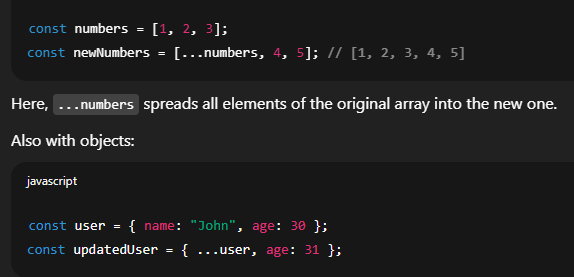 JavaScript-এ spread operator লেখা হয় `...` তিনটি ডট দিয়ে।
এর কাজ হলো array বা object-এর ভিতরের সব উপাদানকে আলাদা করে "ছড়িয়ে দেওয়া" নতুন array বা object-এর মধ্যে।
আমি এটি সাধারণত তিনটি কাজে ব্যবহার করি:
1. কোনো array বা object কপি করতে (reference ছাড়া)।
2. একাধিক array বা object একত্র করতে।
3. function-এ একসাথে অনেক ভ্যালু পাঠাতে।
সারাংশে বললে, spread operator কোডকে করে পরিষ্কার, সহজ এবং ইমিউটেবল, বিশেষ করে React-এর মতো লাইব্রেরিতে state ম্যানেজ করার সময়।
It is used to "spread out" elements from an array or properties from an object into a new array or object.
I mainly use it for three purposes:
1. Copying arrays or objects without reference.
2. Combining multiple arrays or objects.
3. Passing multiple values as arguments to a function.
So, the spread operator helps to create clean and immutable code, especially when working with state in React or managing data structures.
JavaScript-এ spread operator লেখা হয় `...` তিনটি ডট দিয়ে।এর কাজ হলো array বা object-এর ভিতরের সব উপাদানকে আলাদা করে "ছড়িয়ে দেওয়া" নতুন array বা object-এর মধ্যে।
আমি এটি সাধারণত তিনটি কাজে ব্যবহার করি:
1. কোনো array বা object কপি করতে (reference ছাড়া)।
2. একাধিক array বা object একত্র করতে।
3. function-এ একসাথে অনেক ভ্যালু পাঠাতে।
সারাংশে বললে, spread operator কোডকে করে পরিষ্কার, সহজ এবং ইমিউটেবল, বিশেষ করে React-এর মতো লাইব্রেরিতে state ম্যানেজ করার সময়।
In JavaScript, the prototype chain is a mechanism that allows objects to inherit properties and methods from other objects.
Every object in JavaScript has a hidden internal property called `[[Prototype]]`, which refers to another object. This forms a chain of prototypes, and it's used for property lookup.
For example, if we try to access a property on an object, and it doesn’t exist there, JavaScript will look up the chain to see if that property exists in its prototype.
This continues until it reaches `null`, which is the end of the chain.
So, the prototype chain is the base of inheritance in JavaScript. It makes code reusable without duplicating methods in every object.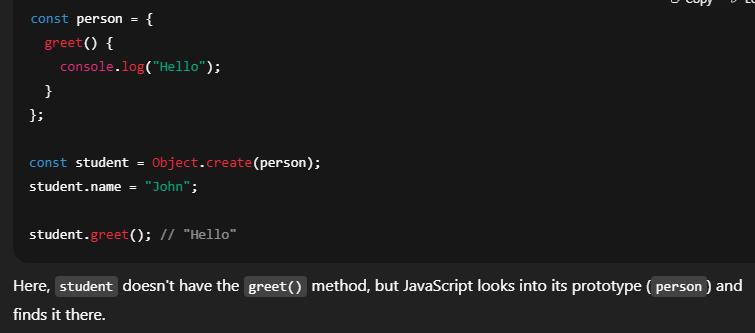 JavaScript-এ prototype chain হলো এমন একটি ব্যবস্থা, যার মাধ্যমে এক object আরেক object থেকে প্রপার্টি এবং মেথড ইনহেরিট করতে পারে।
প্রতিটি object-এর মধ্যে একটি hidden প্রপার্টি থাকে, যাকে `[[Prototype]]` বলা হয়, যেটা আরেকটি object-এর দিকে রেফার করে। এভাবে একের পর এক object রেফার করতে করতে একটি চেইন তৈরি হয়, যেটাকে আমরা prototype chain বলি।
যখন আমরা কোনো প্রপার্টি বা মেথড অ্যাক্সেস করি এবং সেটা ওই object-এ না পাই, তখন JavaScript তার prototype-এ খোঁজে। যদি সেখানেও না পায়, তাহলে উপরের লেভেলগুলোতে খুঁজতে খুঁজতে `null` পর্যন্ত যায়, যেটা চেইনের শেষ।
সংক্ষেপে, prototype chain হচ্ছে JavaScript-এ inheritance বা উত্তরাধিকার করার মূল ভিত্তি। এটি কোডকে reusable এবং efficient করে তোলে।
Every object in JavaScript has a hidden internal property called `[[Prototype]]`, which refers to another object. This forms a chain of prototypes, and it's used for property lookup.
For example, if we try to access a property on an object, and it doesn’t exist there, JavaScript will look up the chain to see if that property exists in its prototype.
This continues until it reaches `null`, which is the end of the chain.
So, the prototype chain is the base of inheritance in JavaScript. It makes code reusable without duplicating methods in every object.
JavaScript-এ prototype chain হলো এমন একটি ব্যবস্থা, যার মাধ্যমে এক object আরেক object থেকে প্রপার্টি এবং মেথড ইনহেরিট করতে পারে।প্রতিটি object-এর মধ্যে একটি hidden প্রপার্টি থাকে, যাকে `[[Prototype]]` বলা হয়, যেটা আরেকটি object-এর দিকে রেফার করে। এভাবে একের পর এক object রেফার করতে করতে একটি চেইন তৈরি হয়, যেটাকে আমরা prototype chain বলি।
যখন আমরা কোনো প্রপার্টি বা মেথড অ্যাক্সেস করি এবং সেটা ওই object-এ না পাই, তখন JavaScript তার prototype-এ খোঁজে। যদি সেখানেও না পায়, তাহলে উপরের লেভেলগুলোতে খুঁজতে খুঁজতে `null` পর্যন্ত যায়, যেটা চেইনের শেষ।
সংক্ষেপে, prototype chain হচ্ছে JavaScript-এ inheritance বা উত্তরাধিকার করার মূল ভিত্তি। এটি কোডকে reusable এবং efficient করে তোলে।
A class is a blueprint or template that defines how an object should be structured. It defines the properties and methods, but it doesn’t hold any actual data.
An object is a real instance created from that class. It has actual values and can use the methods defined in the class.
So, in short:
* Class defines the structure,
* Object holds the actual data and behavior.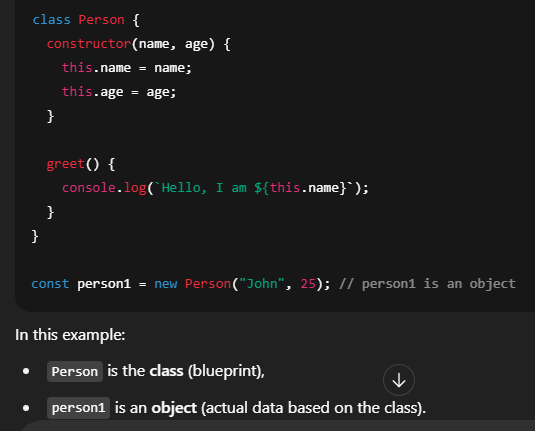 Class হচ্ছে একটি নকশা বা ছাঁচ, যেখানে আমরা বলি একটা object-এর মধ্যে কী কী প্রপার্টি আর মেথড থাকবে। কিন্তু class নিজে কোনো ডাটা ধরে না।
আর Object হচ্ছে সেই class থেকে তৈরি হওয়া বাস্তব instance, যার মধ্যে আসল ভ্যালু আর মেথড থাকে।
সংক্ষেপে:
* Class বলে কী কী থাকবে,
* আর Object আসল ডাটা আর আচরণ নিয়ে কাজ করে।
An object is a real instance created from that class. It has actual values and can use the methods defined in the class.
So, in short:
* Class defines the structure,
* Object holds the actual data and behavior.
Class হচ্ছে একটি নকশা বা ছাঁচ, যেখানে আমরা বলি একটা object-এর মধ্যে কী কী প্রপার্টি আর মেথড থাকবে। কিন্তু class নিজে কোনো ডাটা ধরে না।আর Object হচ্ছে সেই class থেকে তৈরি হওয়া বাস্তব instance, যার মধ্যে আসল ভ্যালু আর মেথড থাকে।
সংক্ষেপে:
* Class বলে কী কী থাকবে,
* আর Object আসল ডাটা আর আচরণ নিয়ে কাজ করে।
In JavaScript, when we pass data to a function, it happens in two ways: Call by Value and Call by Reference.
🔹 Call by Value is used for primitive data types like numbers, strings, booleans. That means a copy of the value is passed to the function. So, any change made inside the function doesn’t affect the original value.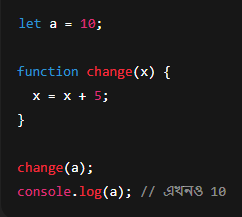 🔹 Call by Reference is used for non-primitive types like objects and arrays. Here, a reference (memory address) is passed to the function. So, changes inside the function do affect the original data.
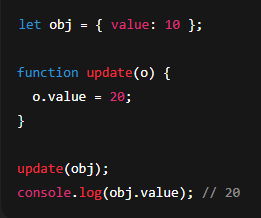 In short:
* Call by Value → Copy of value passed → Original value doesn’t change.
* Call by Reference → Reference passed → Original does change.
JavaScript-এ যখন আমরা ফাংশনে ডাটা পাঠাই, তখন সেটা দুইভাবে হয় — Call by Value আর Call by Reference।
🔹 Call by Value হয় primitive data type যেমন: number, string, boolean ইত্যাদির জন্য। এখানে ভ্যালুর একটা কপি ফাংশনে পাঠানো হয়। তাই ফাংশনের ভিতরে কোনো পরিবর্তন করলে, মূল ভ্যালু বদলায় না।
🔹 Call by Reference হয় object বা array-এর মতো non-primitive type-এর জন্য। এখানে original object-এর reference (ঠিকানা) ফাংশনে পাঠানো হয়। তাই ভিতরে কিছু পরিবর্তন করলে মূল ডাটাও বদলে যায়।
সারাংশে বললে:
* Call by Value → ভ্যালুর কপি যায় → আসল ভ্যালু থাকে আগের মতো।
* Call by Reference → Reference যায় → আসল ডাটা বদলে যায়।
🔹 Call by Value is used for primitive data types like numbers, strings, booleans. That means a copy of the value is passed to the function. So, any change made inside the function doesn’t affect the original value.
🔹 Call by Reference is used for non-primitive types like objects and arrays. Here, a reference (memory address) is passed to the function. So, changes inside the function do affect the original data.In short:* Call by Value → Copy of value passed → Original value doesn’t change.
* Call by Reference → Reference passed → Original does change.
JavaScript-এ যখন আমরা ফাংশনে ডাটা পাঠাই, তখন সেটা দুইভাবে হয় — Call by Value আর Call by Reference।
🔹 Call by Value হয় primitive data type যেমন: number, string, boolean ইত্যাদির জন্য। এখানে ভ্যালুর একটা কপি ফাংশনে পাঠানো হয়। তাই ফাংশনের ভিতরে কোনো পরিবর্তন করলে, মূল ভ্যালু বদলায় না।
🔹 Call by Reference হয় object বা array-এর মতো non-primitive type-এর জন্য। এখানে original object-এর reference (ঠিকানা) ফাংশনে পাঠানো হয়। তাই ভিতরে কিছু পরিবর্তন করলে মূল ডাটাও বদলে যায়।
সারাংশে বললে:
* Call by Value → ভ্যালুর কপি যায় → আসল ভ্যালু থাকে আগের মতো।
* Call by Reference → Reference যায় → আসল ডাটা বদলে যায়।
A higher-order function is a function that either:
1. Takes another function as an argument, or
2. Returns a function as a result, or
3. Does both.
In JavaScript, functions are treated like values. So we can pass them to other functions or return them from functions, and that’s what makes higher-order functions possible.
Common examples are:
* `map()`, `filter()`, and `forEach()` – they take a function as an argument.
* We can also write custom functions that return other functions.
Higher-order functions make JavaScript more powerful, flexible, and are heavily used in functional programming, especially with arrays, callbacks, and React hooks.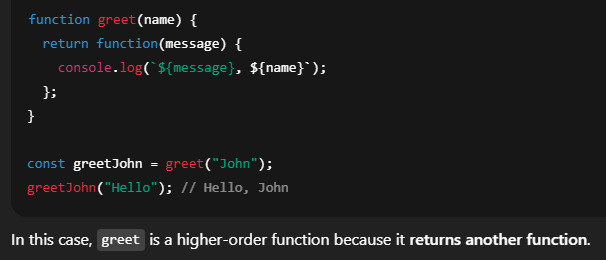 JavaScript-এ higher-order function মানে এমন একটি ফাংশন যেটা:
1. অন্য একটি ফাংশনকে আর্গুমেন্ট হিসেবে নেয়, অথবা
2. ফলাফল হিসেবে আরেকটি ফাংশন রিটার্ন করে, অথবা
3. উভয়টাই করে।
JavaScript-এ ফাংশনকে ভ্যালু হিসেবে ধরা হয়, তাই আমরা ফাংশনকে পাস করতে পারি অথবা ফাংশন থেকে রিটার্ন করতে পারি। এই ফিচার দিয়েই higher-order function কাজ করে।
সাধারণ উদাহরণ:
* `map()`, `filter()`, `forEach()` – এরা ফাংশনকে আর্গুমেন্ট হিসেবে নেয়।
* আবার আমরা নিজেরাও এমন ফাংশন বানাতে পারি যেটা অন্য ফাংশন রিটার্ন করে।
1. Takes another function as an argument, or
2. Returns a function as a result, or
3. Does both.
In JavaScript, functions are treated like values. So we can pass them to other functions or return them from functions, and that’s what makes higher-order functions possible.
Common examples are:
* `map()`, `filter()`, and `forEach()` – they take a function as an argument.
* We can also write custom functions that return other functions.
Higher-order functions make JavaScript more powerful, flexible, and are heavily used in functional programming, especially with arrays, callbacks, and React hooks.
JavaScript-এ higher-order function মানে এমন একটি ফাংশন যেটা:1. অন্য একটি ফাংশনকে আর্গুমেন্ট হিসেবে নেয়, অথবা
2. ফলাফল হিসেবে আরেকটি ফাংশন রিটার্ন করে, অথবা
3. উভয়টাই করে।
JavaScript-এ ফাংশনকে ভ্যালু হিসেবে ধরা হয়, তাই আমরা ফাংশনকে পাস করতে পারি অথবা ফাংশন থেকে রিটার্ন করতে পারি। এই ফিচার দিয়েই higher-order function কাজ করে।
সাধারণ উদাহরণ:
* `map()`, `filter()`, `forEach()` – এরা ফাংশনকে আর্গুমেন্ট হিসেবে নেয়।
* আবার আমরা নিজেরাও এমন ফাংশন বানাতে পারি যেটা অন্য ফাংশন রিটার্ন করে।
Both Local Storage and Session Storage are part of the Web Storage API in JavaScript, and they are used to store data on the client-side, inside the user's browser.
But there are some key differences:
1. Lifetime:
* Local Storage stores data permanently, until it's manually cleared by the user or by code.
* Session Storage stores data only for the current browser tab or session. Once the tab is closed, the data is gone.
2. Scope:
* Local Storage is shared across all tabs and windows of the same origin.
* Session Storage is tab-specific – it’s isolated per tab.
3. Capacity:
* Both usually store around 5–10 MB, but it may vary by browser.
In summary:
* Use Local Storage when you want to persist data even after the browser is closed.
* Use Session Storage when data is only needed temporarily during a single tab session.
Local Storage এবং Session Storage – দুটোই JavaScript-এর Web Storage API-এর অংশ, এবং এগুলো ব্যবহার হয় ব্রাউজারে ক্লায়েন্ট-সাইডে ডাটা সংরক্ষণ করার জন্য।
তবে এদের মধ্যে কিছু গুরুত্বপূর্ণ পার্থক্য আছে:
1. স্থায়িত্ব (Lifetime):
* Local Storage-এ ডাটা থাকে স্থায়ীভাবে, যতক্ষণ না ইউজার বা কোড থেকে মুছে ফেলা হয়।
* Session Storage-এ ডাটা থাকে শুধু ওই ব্রাউজার ট্যাব বন্ধ হওয়া পর্যন্ত।
2. স্কোপ (Scope):
* Local Storage সব ট্যাব এবং উইন্ডোতে শেয়ার হয় যদি একই origin হয়।
* Session Storage শুধুমাত্র ওই নির্দিষ্ট ট্যাবে সীমাবদ্ধ।
3. স্টোরেজ সীমা:
* সাধারণত ৫ থেকে ১০ MB পর্যন্ত ডাটা রাখতে পারে, ব্রাউজার ভেদে ভিন্ন হতে পারে।
সংক্ষেপে বললে:
* যদি আপনি চান ডাটা ব্রাউজার বন্ধ করলেও থেকে যাক, তাহলে Local Storage ব্যবহার করুন।
* আর যদি শুধু একটা সেশনের জন্য ডাটা দরকার হয়, তাহলে Session Storage ভালো।
But there are some key differences:
1. Lifetime:
* Local Storage stores data permanently, until it's manually cleared by the user or by code.
* Session Storage stores data only for the current browser tab or session. Once the tab is closed, the data is gone.
2. Scope:
* Local Storage is shared across all tabs and windows of the same origin.
* Session Storage is tab-specific – it’s isolated per tab.
3. Capacity:
* Both usually store around 5–10 MB, but it may vary by browser.
In summary:
* Use Local Storage when you want to persist data even after the browser is closed.
* Use Session Storage when data is only needed temporarily during a single tab session.
Local Storage এবং Session Storage – দুটোই JavaScript-এর Web Storage API-এর অংশ, এবং এগুলো ব্যবহার হয় ব্রাউজারে ক্লায়েন্ট-সাইডে ডাটা সংরক্ষণ করার জন্য।
তবে এদের মধ্যে কিছু গুরুত্বপূর্ণ পার্থক্য আছে:
1. স্থায়িত্ব (Lifetime):
* Local Storage-এ ডাটা থাকে স্থায়ীভাবে, যতক্ষণ না ইউজার বা কোড থেকে মুছে ফেলা হয়।
* Session Storage-এ ডাটা থাকে শুধু ওই ব্রাউজার ট্যাব বন্ধ হওয়া পর্যন্ত।
2. স্কোপ (Scope):
* Local Storage সব ট্যাব এবং উইন্ডোতে শেয়ার হয় যদি একই origin হয়।
* Session Storage শুধুমাত্র ওই নির্দিষ্ট ট্যাবে সীমাবদ্ধ।
3. স্টোরেজ সীমা:
* সাধারণত ৫ থেকে ১০ MB পর্যন্ত ডাটা রাখতে পারে, ব্রাউজার ভেদে ভিন্ন হতে পারে।
সংক্ষেপে বললে:
* যদি আপনি চান ডাটা ব্রাউজার বন্ধ করলেও থেকে যাক, তাহলে Local Storage ব্যবহার করুন।
* আর যদি শুধু একটা সেশনের জন্য ডাটা দরকার হয়, তাহলে Session Storage ভালো।
Cookies are small pieces of data that a website stores on the user's browser. They are sent to the server with every HTTP request, which makes them useful for tracking and session management.
Each cookie typically has a name, value, and expiration time, and we can set options like domain, path, and whether it's accessible via JavaScript or only on the server (using `HttpOnly`).
I would use cookies mainly for:
1. Authentication – to store login tokens like JWT securely.
2. Session tracking – to keep the user logged in or remember user activity.
3. User preferences – like theme, language, or other settings.
For example, in a login system, we can store the token in an `HttpOnly cookie` to keep it secure from JavaScript attacks like XSS.
Unlike localStorage, cookies are automatically sent to the server with every request, so they are ideal for server-side authentication.
Cookies হলো ছোট ছোট ডাটা, যেগুলো একটি ওয়েবসাইট ইউজারের ব্রাউজারে সংরক্ষণ করে। প্রতিটি HTTP request-এর সঙ্গে এই cookies অটো সার্ভারে পাঠানো হয়, এজন্য এগুলো session tracking এবং authentication-এর জন্য খুবই দরকারি।
প্রতিটি cookie-তে থাকে name, value, এবং expiration time। এছাড়া আমরা domain, path, এবং `HttpOnly` বা `Secure` এর মতো অপশনও সেট করতে পারি।
আমি cookies সাধারণত যেসব ক্ষেত্রে ব্যবহার করি:
1. Authentication – লগইন টোকেন বা JWT সিকিউরলি সংরক্ষণ করতে।
2. Session tracking – ইউজারকে লগইন রাখা বা তাদের কার্যকলাপ ট্র্যাক করতে।
3. User preferences – যেমন থিম, ভাষা বা অন্য সেটিংস মনে রাখতে।
উদাহরণস্বরূপ, আমরা যদি JWT token `HttpOnly cookie`-তে রাখি, তাহলে সেটা JavaScript থেকে access করা যায় না, ফলে XSS অ্যাটাক থেকে সুরক্ষা পাওয়া যায়।
Cookies-এর সুবিধা হলো, এগুলো অটো সার্ভারে পাঠানো হয়, তাই server-side authentication-এর ক্ষেত্রে এগুলো সবচেয়ে কার্যকর।
Each cookie typically has a name, value, and expiration time, and we can set options like domain, path, and whether it's accessible via JavaScript or only on the server (using `HttpOnly`).
I would use cookies mainly for:
1. Authentication – to store login tokens like JWT securely.
2. Session tracking – to keep the user logged in or remember user activity.
3. User preferences – like theme, language, or other settings.
For example, in a login system, we can store the token in an `HttpOnly cookie` to keep it secure from JavaScript attacks like XSS.
Unlike localStorage, cookies are automatically sent to the server with every request, so they are ideal for server-side authentication.
Cookies হলো ছোট ছোট ডাটা, যেগুলো একটি ওয়েবসাইট ইউজারের ব্রাউজারে সংরক্ষণ করে। প্রতিটি HTTP request-এর সঙ্গে এই cookies অটো সার্ভারে পাঠানো হয়, এজন্য এগুলো session tracking এবং authentication-এর জন্য খুবই দরকারি।
প্রতিটি cookie-তে থাকে name, value, এবং expiration time। এছাড়া আমরা domain, path, এবং `HttpOnly` বা `Secure` এর মতো অপশনও সেট করতে পারি।
আমি cookies সাধারণত যেসব ক্ষেত্রে ব্যবহার করি:
1. Authentication – লগইন টোকেন বা JWT সিকিউরলি সংরক্ষণ করতে।
2. Session tracking – ইউজারকে লগইন রাখা বা তাদের কার্যকলাপ ট্র্যাক করতে।
3. User preferences – যেমন থিম, ভাষা বা অন্য সেটিংস মনে রাখতে।
উদাহরণস্বরূপ, আমরা যদি JWT token `HttpOnly cookie`-তে রাখি, তাহলে সেটা JavaScript থেকে access করা যায় না, ফলে XSS অ্যাটাক থেকে সুরক্ষা পাওয়া যায়।
Cookies-এর সুবিধা হলো, এগুলো অটো সার্ভারে পাঠানো হয়, তাই server-side authentication-এর ক্ষেত্রে এগুলো সবচেয়ে কার্যকর।
Object-Oriented Programming, or OOP, is a programming style based on the concept of objects. These objects represent real-world entities and contain both data (properties) and functions (methods) that work on that data.
OOP helps to write structured, reusable, and maintainable code, especially in large projects.
There are four main principles of OOP:
1. Encapsulation – Wrapping data and functions together inside an object, so internal details are hidden from outside.
2. Inheritance – One class can inherit properties and methods from another class, which promotes code reuse.
3. Polymorphism – Same function or method behaves differently based on context or data type.
4. Abstraction – Hiding complex logic and showing only essential features to the user.
So, in short, OOP makes code modular, organized, and easier to manage.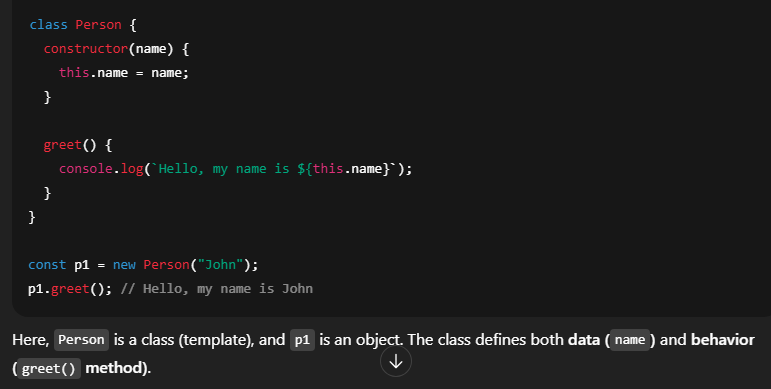 Object-Oriented Programming, সংক্ষেপে OOP, হলো এমন একটি প্রোগ্রামিং স্টাইল, যেখানে কোড লেখা হয় object বা বস্তুকে ভিত্তি করে। প্রতিটি object-এ থাকে data (property) এবং সেই data-র উপর কাজ করার function (method)।
OOP-এর মাধ্যমে আমরা খুবই structured, reusable, এবং maintainable কোড লিখতে পারি, বিশেষ করে বড় প্রজেক্টে।
OOP-এর চারটি মূল বৈশিষ্ট্য আছে:
1. Encapsulation – ডাটা ও ফাংশনকে একসাথে object-এর ভিতরে রাখে এবং বাইরের থেকে কিছু লুকিয়ে রাখে।
2. Inheritance – এক class অন্য class থেকে property ও method নিতে পারে। এতে কোড পুনর্ব্যবহার করা যায়।
3. Polymorphism – একই method বা function বিভিন্নভাবে ব্যবহার করা যায়, context অনুযায়ী।
4. Abstraction – জটিল বিষয়গুলো লুকিয়ে রেখে শুধু প্রয়োজনীয় অংশ ইউজারকে দেখায়।
সংক্ষেপে বললে:
OOP কোডকে করে আরও পরিচ্ছন্ন, মডুলার এবং সহজে ব্যবস্থাপনা যোগ্য।
OOP helps to write structured, reusable, and maintainable code, especially in large projects.
There are four main principles of OOP:
1. Encapsulation – Wrapping data and functions together inside an object, so internal details are hidden from outside.
2. Inheritance – One class can inherit properties and methods from another class, which promotes code reuse.
3. Polymorphism – Same function or method behaves differently based on context or data type.
4. Abstraction – Hiding complex logic and showing only essential features to the user.
So, in short, OOP makes code modular, organized, and easier to manage.
Object-Oriented Programming, সংক্ষেপে OOP, হলো এমন একটি প্রোগ্রামিং স্টাইল, যেখানে কোড লেখা হয় object বা বস্তুকে ভিত্তি করে। প্রতিটি object-এ থাকে data (property) এবং সেই data-র উপর কাজ করার function (method)।OOP-এর মাধ্যমে আমরা খুবই structured, reusable, এবং maintainable কোড লিখতে পারি, বিশেষ করে বড় প্রজেক্টে।
OOP-এর চারটি মূল বৈশিষ্ট্য আছে:
1. Encapsulation – ডাটা ও ফাংশনকে একসাথে object-এর ভিতরে রাখে এবং বাইরের থেকে কিছু লুকিয়ে রাখে।
2. Inheritance – এক class অন্য class থেকে property ও method নিতে পারে। এতে কোড পুনর্ব্যবহার করা যায়।
3. Polymorphism – একই method বা function বিভিন্নভাবে ব্যবহার করা যায়, context অনুযায়ী।
4. Abstraction – জটিল বিষয়গুলো লুকিয়ে রেখে শুধু প্রয়োজনীয় অংশ ইউজারকে দেখায়।
সংক্ষেপে বললে:
OOP কোডকে করে আরও পরিচ্ছন্ন, মডুলার এবং সহজে ব্যবস্থাপনা যোগ্য।
Array and Linked List are both linear data structures used to store a collection of elements, but they work in very different ways.
Here are the key differences:
1. Memory Allocation:
* Arrays use contiguous memory – all elements are stored next to each other.
* Linked Lists use non-contiguous memory – each element (called a node) points to the next.
2. Access Time:
* Arrays allow fast access using indexes (O(1)).
* Linked Lists require sequential traversal (O(n)) to access elements.
3. Insertion & Deletion:
* In Arrays, inserting or deleting in the middle is costly because we need to shift elements.
* In Linked Lists, insertion and deletion are faster as we just update pointers.
4. Size:
* Arrays have fixed size (unless you use dynamic arrays).
* Linked Lists are dynamic, they can grow or shrink as needed.
Summary:
* Use arrays when you need fast access.
* Use linked lists when you need fast insertion/deletion or dynamic size.
Array এবং Linked List – দুটোই লিনিয়ার ডাটা স্ট্রাকচার, অর্থাৎ একটার পর একটা ডাটা রাখে। তবে এদের কাজ করার পদ্ধতিতে অনেক পার্থক্য আছে।
মূল পার্থক্যগুলো হলো:
1. মেমোরি অ্যলোকেশন:
* Array-এ সব উপাদান একটানা (contiguous) মেমোরিতে থাকে।
* Linked List-এ প্রতিটি node আলাদা জায়গায় থাকে, এবং পয়েন্টার দিয়ে একে অপরের সাথে যুক্ত থাকে।
2. এক্সেস টাইম:
* Array-তে index দিয়ে দ্রুত access (O(1)) করা যায়।
* Linked List-এ sequentially traverse করে ধীরে access (O(n)) করতে হয়।
3. ইনসার্ট এবং ডিলিট:
* Array-তে মাঝখানে কিছু insert বা delete করলে অনেক শিফট করতে হয়, তাই ব্যয়বহুল।
* Linked List-এ শুধু pointer update করলেই হয়, তাই insert/delete দ্রুত হয়।
4. সাইজ:
* Array-র সাইজ সাধারণত fixed থাকে।
* Linked List-র সাইজ dynamic, যত ইচ্ছা বাড়ানো বা কমানো যায়।
সংক্ষেপে বললে:
* যদি দ্রুত access দরকার হয়, তাহলে Array ভালো।
* যদি frequent insert/delete বা dynamic size দরকার হয়, তাহলে Linked List ব্যবহার করা ভালো।
Here are the key differences:
1. Memory Allocation:
* Arrays use contiguous memory – all elements are stored next to each other.
* Linked Lists use non-contiguous memory – each element (called a node) points to the next.
2. Access Time:
* Arrays allow fast access using indexes (O(1)).
* Linked Lists require sequential traversal (O(n)) to access elements.
3. Insertion & Deletion:
* In Arrays, inserting or deleting in the middle is costly because we need to shift elements.
* In Linked Lists, insertion and deletion are faster as we just update pointers.
4. Size:
* Arrays have fixed size (unless you use dynamic arrays).
* Linked Lists are dynamic, they can grow or shrink as needed.
Summary:
* Use arrays when you need fast access.
* Use linked lists when you need fast insertion/deletion or dynamic size.
Array এবং Linked List – দুটোই লিনিয়ার ডাটা স্ট্রাকচার, অর্থাৎ একটার পর একটা ডাটা রাখে। তবে এদের কাজ করার পদ্ধতিতে অনেক পার্থক্য আছে।
মূল পার্থক্যগুলো হলো:
1. মেমোরি অ্যলোকেশন:
* Array-এ সব উপাদান একটানা (contiguous) মেমোরিতে থাকে।
* Linked List-এ প্রতিটি node আলাদা জায়গায় থাকে, এবং পয়েন্টার দিয়ে একে অপরের সাথে যুক্ত থাকে।
2. এক্সেস টাইম:
* Array-তে index দিয়ে দ্রুত access (O(1)) করা যায়।
* Linked List-এ sequentially traverse করে ধীরে access (O(n)) করতে হয়।
3. ইনসার্ট এবং ডিলিট:
* Array-তে মাঝখানে কিছু insert বা delete করলে অনেক শিফট করতে হয়, তাই ব্যয়বহুল।
* Linked List-এ শুধু pointer update করলেই হয়, তাই insert/delete দ্রুত হয়।
4. সাইজ:
* Array-র সাইজ সাধারণত fixed থাকে।
* Linked List-র সাইজ dynamic, যত ইচ্ছা বাড়ানো বা কমানো যায়।
সংক্ষেপে বললে:
* যদি দ্রুত access দরকার হয়, তাহলে Array ভালো।
* যদি frequent insert/delete বা dynamic size দরকার হয়, তাহলে Linked List ব্যবহার করা ভালো।
When I need to debug a JavaScript application, I usually follow a step-by-step process to identify and fix the issue effectively.
1. Use `console.log()` –
First, I check the flow or variable values using `console.log()` statements. This is quick and helps narrow down where the bug is happening.
2. Browser Developer Tools –
I use Chrome DevTools or Firefox Developer Tools to:
* Inspect elements,
* Check console errors,
* Use the Sources tab to add breakpoints and step through the code line-by-line.
3. Debugger Statement –
I sometimes insert the `debugger;` keyword in my code. When DevTools is open, it pauses execution at that point so I can inspect variable values.
4. Check Network Tab –
For frontend-backend issues, I check the Network tab to see API requests and responses, status codes, and payloads.
5. Linting Tools –
I use tools like ESLint to catch syntax or logic errors early while writing the code.
6. Try-Catch Blocks –
For asynchronous code or API errors, I use `try-catch` to safely catch and log exceptions.
7. Stack Traces & Error Messages –
I always read the full error message and check the stack trace to trace where the problem is coming from.
In short, I try to understand the bug logically, then use the right tools to trace and fix it.
আমি যখন একটি JavaScript অ্যাপ্লিকেশন ডিবাগ করি, তখন একটা ধারাবাহিক ধাপে ধাপে পদ্ধতি অনুসরণ করি যাতে সমস্যাটা সঠিকভাবে চিহ্নিত ও সমাধান করা যায়।
1. `console.log()` ব্যবহার করি –
শুরুতে আমি বিভিন্ন ভ্যারিয়েবল বা কোডের flow বোঝার জন্য `console.log()` ব্যবহার করি। এটা খুব দ্রুত এবং সহজে সমস্যা খুঁজে বের করতে সাহায্য করে।
2. Browser-এর Developer Tools –
আমি Chrome বা Firefox-এর DevTools ব্যবহার করি:
* Console-এর error চেক করতে,
* Sources tab থেকে breakpoint বসিয়ে এক একটি লাইন দেখে বুঝতে,
* DOM বা element structure চেক করতে।
3. `debugger` ব্যবহার করি –
আমি মাঝে মাঝে কোডে `debugger;` লিখে দিই, যাতে DevTools খোলা থাকলে কোড সেই লাইনে এসে pause হয়। তখন আমি ভ্যারিয়েবলগুলো সহজে দেখতে পারি।
4. Network Tab দেখছি –
ফ্রন্টএন্ড ও ব্যাকএন্ড issue হলে আমি Network tab থেকে:
* API call ঠিক হচ্ছে কিনা,
* Status code কী আসছে,
* Data ঠিকভাবে যাচ্ছে কিনা – সব চেক করি।
5. Linting Tools ব্যবহার করি –
আমি ESLint-এর মতো tool ব্যবহার করি যাতে syntax বা logic error আগেই ধরা পড়ে।
6. Try-Catch Block –
Async ফাংশন বা API call ডিবাগ করতে `try-catch` দিয়ে error ধরার ব্যবস্থা করি।
7. Error message ও stack trace ভালো করে পড়ি –
আমি পুরো error message পড়ি এবং stack trace থেকে বুঝে নেই কোন লাইনে ও কোন ফাংশনে সমস্যা হচ্ছে।
সংক্ষেপে বললে:
আমি সমস্যাটাকে ভালোভাবে বুঝে, তারপর উপযুক্ত টুল বা পদ্ধতি দিয়ে সেটাকে track ও fix করার চেষ্টা করি।
1. Use `console.log()` –
First, I check the flow or variable values using `console.log()` statements. This is quick and helps narrow down where the bug is happening.
2. Browser Developer Tools –
I use Chrome DevTools or Firefox Developer Tools to:
* Inspect elements,
* Check console errors,
* Use the Sources tab to add breakpoints and step through the code line-by-line.
3. Debugger Statement –
I sometimes insert the `debugger;` keyword in my code. When DevTools is open, it pauses execution at that point so I can inspect variable values.
4. Check Network Tab –
For frontend-backend issues, I check the Network tab to see API requests and responses, status codes, and payloads.
5. Linting Tools –
I use tools like ESLint to catch syntax or logic errors early while writing the code.
6. Try-Catch Blocks –
For asynchronous code or API errors, I use `try-catch` to safely catch and log exceptions.
7. Stack Traces & Error Messages –
I always read the full error message and check the stack trace to trace where the problem is coming from.
In short, I try to understand the bug logically, then use the right tools to trace and fix it.
আমি যখন একটি JavaScript অ্যাপ্লিকেশন ডিবাগ করি, তখন একটা ধারাবাহিক ধাপে ধাপে পদ্ধতি অনুসরণ করি যাতে সমস্যাটা সঠিকভাবে চিহ্নিত ও সমাধান করা যায়।
1. `console.log()` ব্যবহার করি –
শুরুতে আমি বিভিন্ন ভ্যারিয়েবল বা কোডের flow বোঝার জন্য `console.log()` ব্যবহার করি। এটা খুব দ্রুত এবং সহজে সমস্যা খুঁজে বের করতে সাহায্য করে।
2. Browser-এর Developer Tools –
আমি Chrome বা Firefox-এর DevTools ব্যবহার করি:
* Console-এর error চেক করতে,
* Sources tab থেকে breakpoint বসিয়ে এক একটি লাইন দেখে বুঝতে,
* DOM বা element structure চেক করতে।
3. `debugger` ব্যবহার করি –
আমি মাঝে মাঝে কোডে `debugger;` লিখে দিই, যাতে DevTools খোলা থাকলে কোড সেই লাইনে এসে pause হয়। তখন আমি ভ্যারিয়েবলগুলো সহজে দেখতে পারি।
4. Network Tab দেখছি –
ফ্রন্টএন্ড ও ব্যাকএন্ড issue হলে আমি Network tab থেকে:
* API call ঠিক হচ্ছে কিনা,
* Status code কী আসছে,
* Data ঠিকভাবে যাচ্ছে কিনা – সব চেক করি।
5. Linting Tools ব্যবহার করি –
আমি ESLint-এর মতো tool ব্যবহার করি যাতে syntax বা logic error আগেই ধরা পড়ে।
6. Try-Catch Block –
Async ফাংশন বা API call ডিবাগ করতে `try-catch` দিয়ে error ধরার ব্যবস্থা করি।
7. Error message ও stack trace ভালো করে পড়ি –
আমি পুরো error message পড়ি এবং stack trace থেকে বুঝে নেই কোন লাইনে ও কোন ফাংশনে সমস্যা হচ্ছে।
সংক্ষেপে বললে:
আমি সমস্যাটাকে ভালোভাবে বুঝে, তারপর উপযুক্ত টুল বা পদ্ধতি দিয়ে সেটাকে track ও fix করার চেষ্টা করি।
In ES6, template literals are a new way to work with strings.
They are defined using backticks `` instead of regular quotes (`' '` or `" "`).
The biggest advantages of template literals are:
1. String Interpolation –
We can easily insert variables or expressions inside a string using `$` syntax.
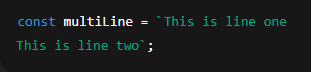
2. Multi-line Strings –
We can write strings in multiple lines without using `\n` or concatenation.
So, template literals make string handling cleaner, easier, and more readable, especially when combining multiple variables or HTML structures in JavaScript.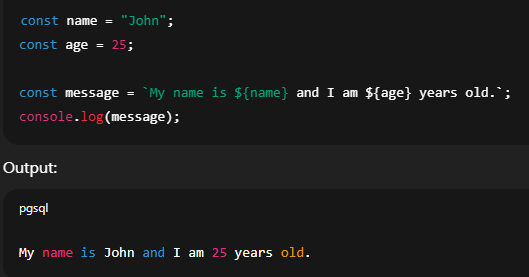
 ES6-এ template literal হলো নতুনভাবে string নিয়ে কাজ করার একটি সহজ পদ্ধতি।
এটি আমরা backtick (``) দিয়ে লিখি, সাধারণ কোট (`' '`বা`" "\`) এর বদলে।
Template literal-এর মূল সুবিধাগুলো হলো:
1. String Interpolation –
আমরা `$` এর ভিতরে ভ্যারিয়েবল বা এক্সপ্রেশন রেখে সরাসরি string-এর ভিতর বসাতে পারি।
2. Multi-line String –
একাধিক লাইনে string লিখতে পারি, `\n` বা `+` ব্যবহার না করেই।
সংক্ষেপে, template literal আমাদের string manage করতে সহজ, ক্লিন, এবং রিডেবল করে তোলে, বিশেষ করে যখন অনেক ভ্যারিয়েবল একসাথে বসাতে হয় বা বড় HTML বানাতে হয়।
They are defined using backticks `` instead of regular quotes (`' '` or `" "`).
The biggest advantages of template literals are:
1. String Interpolation –
We can easily insert variables or expressions inside a string using `$` syntax.
2. Multi-line Strings –
We can write strings in multiple lines without using `\n` or concatenation.
So, template literals make string handling cleaner, easier, and more readable, especially when combining multiple variables or HTML structures in JavaScript.
ES6-এ template literal হলো নতুনভাবে string নিয়ে কাজ করার একটি সহজ পদ্ধতি।এটি আমরা backtick (``) দিয়ে লিখি, সাধারণ কোট (`' '`বা`" "\`) এর বদলে।
Template literal-এর মূল সুবিধাগুলো হলো:
1. String Interpolation –
আমরা `$` এর ভিতরে ভ্যারিয়েবল বা এক্সপ্রেশন রেখে সরাসরি string-এর ভিতর বসাতে পারি।
2. Multi-line String –
একাধিক লাইনে string লিখতে পারি, `\n` বা `+` ব্যবহার না করেই।
সংক্ষেপে, template literal আমাদের string manage করতে সহজ, ক্লিন, এবং রিডেবল করে তোলে, বিশেষ করে যখন অনেক ভ্যারিয়েবল একসাথে বসাতে হয় বা বড় HTML বানাতে হয়।
Both spread and rest operators use the same syntax — three dots (`...`) — but they are used in different contexts and behave differently.
🔹 Spread Operator (`...`)
Purpose: To expand or unpack elements from an array or object.
Used in: Function arguments, array/object cloning, merging.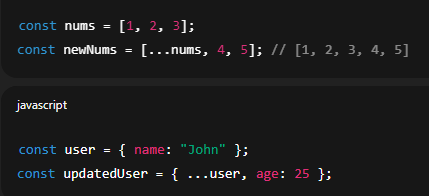 🔹 Rest Operator (`...`)
Purpose: To collect or pack multiple elements into a single array or object.
Used in: Function parameters or destructuring.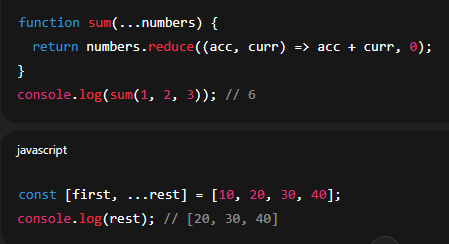 In short:
* Spread: Break things apart
* Rest: Gather things together
Same syntax, opposite purpose.
Spread আর Rest — দুইটাতেই `...` তিনটি ডট ব্যবহার হয়, কিন্তু ওদের কাজ একেবারে উল্টো।
🔹 Spread Operator (`...`)
কাজ: কোনো array বা object-এর ভিতরের উপাদানগুলোকে ভেঙে বাইরে বের করে আনে।
ব্যবহার হয়: নতুন array/object বানাতে, combine করতে, function-এ multiple argument পাঠাতে।
🔹 Rest Operator (`...`)
কাজ: অনেক ভ্যালু বা উপাদানকে একসাথে একটি array বা object-এর মধ্যে নিয়ে আসে।
ব্যবহার হয়: ফাংশনের parameter-এ, destructuring-এ।
সংক্ষেপে:
* Spread → ভেঙে ফেলে
* Rest → জমা করে
একই `...` চিহ্ন হলেও, কাজ একদম বিপরীত।
🔹 Spread Operator (`...`)
Purpose: To expand or unpack elements from an array or object.
Used in: Function arguments, array/object cloning, merging.
🔹 Rest Operator (`...`)Purpose: To collect or pack multiple elements into a single array or object.
Used in: Function parameters or destructuring.
In short:* Spread: Break things apart
* Rest: Gather things together
Same syntax, opposite purpose.
Spread আর Rest — দুইটাতেই `...` তিনটি ডট ব্যবহার হয়, কিন্তু ওদের কাজ একেবারে উল্টো।
🔹 Spread Operator (`...`)
কাজ: কোনো array বা object-এর ভিতরের উপাদানগুলোকে ভেঙে বাইরে বের করে আনে।
ব্যবহার হয়: নতুন array/object বানাতে, combine করতে, function-এ multiple argument পাঠাতে।
🔹 Rest Operator (`...`)
কাজ: অনেক ভ্যালু বা উপাদানকে একসাথে একটি array বা object-এর মধ্যে নিয়ে আসে।
ব্যবহার হয়: ফাংশনের parameter-এ, destructuring-এ।
সংক্ষেপে:
* Spread → ভেঙে ফেলে
* Rest → জমা করে
একই `...` চিহ্ন হলেও, কাজ একদম বিপরীত।
Destructuring is a feature introduced in ES6 that allows us to extract values from arrays or objects and assign them to variables in a clean and simple way.
It helps write shorter, more readable code when we need to access multiple values.
We can also rename variables and use default values during destructuring.
Destructuring is widely used in React props, function parameters, and working with APIs.
In short:
Destructuring is a clean syntax to extract multiple values from arrays or objects.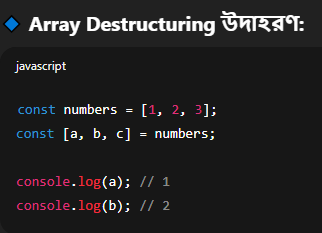
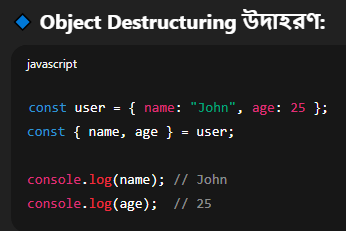 Destructuring হলো ES6-এর একটি সুবিধা, যেটার মাধ্যমে আমরা array বা object থেকে এক বা একাধিক ভ্যালু সহজভাবে আলাদা করে ভ্যারিয়েবল-এ রাখতে পারি।
এটা কোডকে সংক্ষিপ্ত এবং রিডেবল করে তোলে।
আমরা চাইলে ভ্যারিয়েবলের নাম পুনঃনামকরণ বা ডিফল্ট ভ্যালু-ও দিতে পারি।
Destructuring সাধারণত React props, function parameters, API response handle করার সময় অনেক ব্যবহৃত হয়।
সংক্ষেপে:
Destructuring মানে হচ্ছে array বা object থেকে ডাটা বের করে নেওয়া সহজ এবং পরিষ্কার উপায়ে।
It helps write shorter, more readable code when we need to access multiple values.
We can also rename variables and use default values during destructuring.
Destructuring is widely used in React props, function parameters, and working with APIs.
In short:
Destructuring is a clean syntax to extract multiple values from arrays or objects.
Destructuring হলো ES6-এর একটি সুবিধা, যেটার মাধ্যমে আমরা array বা object থেকে এক বা একাধিক ভ্যালু সহজভাবে আলাদা করে ভ্যারিয়েবল-এ রাখতে পারি।এটা কোডকে সংক্ষিপ্ত এবং রিডেবল করে তোলে।
আমরা চাইলে ভ্যারিয়েবলের নাম পুনঃনামকরণ বা ডিফল্ট ভ্যালু-ও দিতে পারি।
Destructuring সাধারণত React props, function parameters, API response handle করার সময় অনেক ব্যবহৃত হয়।
সংক্ষেপে:
Destructuring মানে হচ্ছে array বা object থেকে ডাটা বের করে নেওয়া সহজ এবং পরিষ্কার উপায়ে।
The ternary operator is a short-hand way of writing an if-else condition in JavaScript. It’s called “ternary” because it takes three parts: a condition, a true expression, and a false expression.
The syntax is:
condition ? expressionIfTrue : expressionIfFalse;
It makes code shorter, cleaner, especially when returning values based on a condition.
I often use ternary in places like JSX (in React), return statements, or inline conditional rendering.
Ternary operator হলো JavaScript-এ if-else-এর সংক্ষিপ্ত রূপ, যেটা আমরা এক লাইনেই কন্ডিশন চেক করতে ব্যবহার করি।
এটা “ternary” বলা হয় কারণ এতে তিনটি অংশ থাকে:
একটি condition, একটি true হলে কী হবে, এবং একটি false হলে কী হবে।
এর syntax হলো:
condition ? expressionIfTrue : expressionIfFalse;
এটা কোডকে ছোট, পরিষ্কার এবং পাঠযোগ্য করে তোলে, বিশেষ করে যখন রিটার্ন বা condition অনুযায়ী কিছু দেখাতে হয় – যেমন React JSX-এ।
The syntax is:
condition ? expressionIfTrue : expressionIfFalse;
It makes code shorter, cleaner, especially when returning values based on a condition.
I often use ternary in places like JSX (in React), return statements, or inline conditional rendering.
Ternary operator হলো JavaScript-এ if-else-এর সংক্ষিপ্ত রূপ, যেটা আমরা এক লাইনেই কন্ডিশন চেক করতে ব্যবহার করি।
এটা “ternary” বলা হয় কারণ এতে তিনটি অংশ থাকে:
একটি condition, একটি true হলে কী হবে, এবং একটি false হলে কী হবে।
এর syntax হলো:
condition ? expressionIfTrue : expressionIfFalse;
এটা কোডকে ছোট, পরিষ্কার এবং পাঠযোগ্য করে তোলে, বিশেষ করে যখন রিটার্ন বা condition অনুযায়ী কিছু দেখাতে হয় – যেমন React JSX-এ।
In JavaScript, both regular functions and arrow functions are used to define functions, but they have some important differences.
Arrow functions are shorter and cleaner, especially for one-liners.
🔹 1. `this` Keyword Behavior
* The most important difference is how they handle the `this` keyword.
* In a regular function, `this` refers to the calling object.
* In an arrow function, `this` is lexically bound, meaning it uses `this` from its parent scope.
🔹 2. Use Cases
* Use arrow functions for short callbacks, array methods, or when we don’t need `this`.
* Use regular functions when you need access to `this`, or you're defining methods in objects or classes.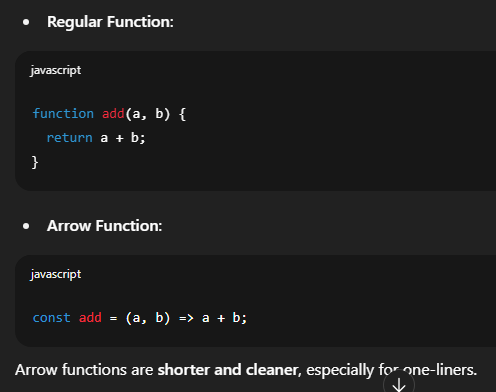 JavaScript-এ Regular Function আর Arrow Function দুইভাবেই ফাংশন লেখা যায়, কিন্তু এদের মধ্যে কিছু গুরুত্বপূর্ণ পার্থক্য আছে।
🔹 1. `this` কীভাবে কাজ করে
* Regular Function-এ `this` মানে হলো যে object ফাংশনকে কল করছে, সেই object।
* Arrow Function-এ `this` হয় parent scope থেকে নেওয়া — একে বলে lexical `this`।
🔹 2. কোথায় কোনটা ব্যবহার করব
* ছোট কাজ বা callback function-এ Arrow Function ভালো।
* Object বা class method-এ Regular Function ব্যবহার করা উচিত, কারণ `this` দরকার হয়।
Arrow functions are shorter and cleaner, especially for one-liners.
🔹 1. `this` Keyword Behavior
* The most important difference is how they handle the `this` keyword.
* In a regular function, `this` refers to the calling object.
* In an arrow function, `this` is lexically bound, meaning it uses `this` from its parent scope.
🔹 2. Use Cases
* Use arrow functions for short callbacks, array methods, or when we don’t need `this`.
* Use regular functions when you need access to `this`, or you're defining methods in objects or classes.
JavaScript-এ Regular Function আর Arrow Function দুইভাবেই ফাংশন লেখা যায়, কিন্তু এদের মধ্যে কিছু গুরুত্বপূর্ণ পার্থক্য আছে।🔹 1. `this` কীভাবে কাজ করে
* Regular Function-এ `this` মানে হলো যে object ফাংশনকে কল করছে, সেই object।
* Arrow Function-এ `this` হয় parent scope থেকে নেওয়া — একে বলে lexical `this`।
🔹 2. কোথায় কোনটা ব্যবহার করব
* ছোট কাজ বা callback function-এ Arrow Function ভালো।
* Object বা class method-এ Regular Function ব্যবহার করা উচিত, কারণ `this` দরকার হয়।
IIFE stands for Immediately Invoked Function Expression.
It’s a function that runs as soon as it is defined.
The main purpose of using IIFE is to create a private scope, so that variables inside it don’t pollute the global scope.
🔹 Why use IIFE?
1. Avoid polluting global variables
2. Create isolated, private logic
3. Used in older JavaScript to simulate block scope
Summary:
* IIFE = function that runs immediately after it’s created
* Used to encapsulate logic and protect variables from global access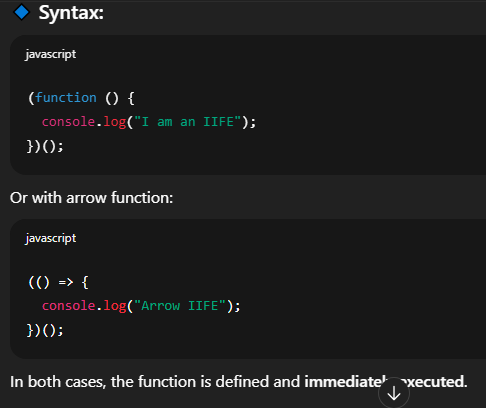 IIFE মানে হলো Immediately Invoked Function Expression।
এটি এমন একটি ফাংশন যেটা ডিক্লেয়ার করার সাথে সাথে এক্সিকিউট হয়ে যায়।
এর প্রধান উদ্দেশ্য হলো নিজস্ব scope তৈরি করা, যাতে ভেতরের ভ্যারিয়েবলগুলো বাইরের থেকে access না করা যায়।
🔹 কেন ব্যবহার করব?
1. Global scope নোংরা হওয়া থেকে বাঁচায়
2. Private scope তৈরি করে
3. পুরানো JavaScript-এ block scope না থাকায় এইভাবে ব্যবহার হতো
সংক্ষেপে:
* IIFE = সাথে সাথে চলে এমন function
* ব্যবহার হয় scope আলাদা রাখতে, global variable বাঁচাতে
It’s a function that runs as soon as it is defined.
The main purpose of using IIFE is to create a private scope, so that variables inside it don’t pollute the global scope.
🔹 Why use IIFE?
1. Avoid polluting global variables
2. Create isolated, private logic
3. Used in older JavaScript to simulate block scope
Summary:
* IIFE = function that runs immediately after it’s created
* Used to encapsulate logic and protect variables from global access
IIFE মানে হলো Immediately Invoked Function Expression। এটি এমন একটি ফাংশন যেটা ডিক্লেয়ার করার সাথে সাথে এক্সিকিউট হয়ে যায়।
এর প্রধান উদ্দেশ্য হলো নিজস্ব scope তৈরি করা, যাতে ভেতরের ভ্যারিয়েবলগুলো বাইরের থেকে access না করা যায়।
🔹 কেন ব্যবহার করব?
1. Global scope নোংরা হওয়া থেকে বাঁচায়
2. Private scope তৈরি করে
3. পুরানো JavaScript-এ block scope না থাকায় এইভাবে ব্যবহার হতো
সংক্ষেপে:
* IIFE = সাথে সাথে চলে এমন function
* ব্যবহার হয় scope আলাদা রাখতে, global variable বাঁচাতে