
JavaScript is a high-level, interpreted programming language primarily used to create interactive and dynamic content on websites. It is one of the core technologies of the web, alongside HTML and CSS. JavaScript enables developers to implement features like interactive forms, animations, real-time updates, and more. It runs in the browser using JavaScript engines like V8 (in Chrome) and can also run on the server using environments like Node.js.
Key Points:
- High-level, interpreted scripting language
- Mainly used for client-side interactivity
- Can also be used for server-side programming using Node.js
- Supports object-oriented, functional, and event-driven programming
জাভাস্ক্রিপ্ট একটি হাই-লেভেল, ইন্টারপ্রেটেড প্রোগ্রামিং ল্যাঙ্গুয়েজ যা মূলত ওয়েবসাইটে ইন্টারঅ্যাকটিভ ও ডায়নামিক কনটেন্ট তৈরির জন্য ব্যবহৃত হয়। এটি HTML ও CSS-এর সাথে ওয়েবের প্রধান তিনটি প্রযুক্তির একটি। জাভাস্ক্রিপ্ট ব্যবহার করে ডেভেলপাররা ইন্টারঅ্যাকটিভ ফর্ম, অ্যানিমেশন, রিয়েল-টাইম আপডেট ইত্যাদি ফিচার যুক্ত করতে পারেন। এটি ব্রাউজারে রান করে জাভাস্ক্রিপ্ট ইঞ্জিন(যেমন: Chrome-এর V8 ইঞ্জিন) ব্যাবহার করে, আবার Node.js এর মাধ্যমে সার্ভারেও রান করানো যায়।
মূল পয়েন্টগুলো:
- হাই-লেভেল ও ইন্টারপ্রেটেড স্ক্রিপ্টিং ল্যাঙ্গুয়েজ
- ক্লায়েন্ট-সাইড ইন্টারঅ্যাকশন তৈরিতে ব্যবহৃত হয়
- Node.js দিয়ে সার্ভার-সাইডেও ব্যবহৃত হয়
- অবজেক্ট-ওরিয়েন্টেড, ফাংশনাল ও ইভেন্ট-ড্রিভেন প্রোগ্রামিং সাপোর্ট করে
Key Points:
- High-level, interpreted scripting language
- Mainly used for client-side interactivity
- Can also be used for server-side programming using Node.js
- Supports object-oriented, functional, and event-driven programming
জাভাস্ক্রিপ্ট একটি হাই-লেভেল, ইন্টারপ্রেটেড প্রোগ্রামিং ল্যাঙ্গুয়েজ যা মূলত ওয়েবসাইটে ইন্টারঅ্যাকটিভ ও ডায়নামিক কনটেন্ট তৈরির জন্য ব্যবহৃত হয়। এটি HTML ও CSS-এর সাথে ওয়েবের প্রধান তিনটি প্রযুক্তির একটি। জাভাস্ক্রিপ্ট ব্যবহার করে ডেভেলপাররা ইন্টারঅ্যাকটিভ ফর্ম, অ্যানিমেশন, রিয়েল-টাইম আপডেট ইত্যাদি ফিচার যুক্ত করতে পারেন। এটি ব্রাউজারে রান করে জাভাস্ক্রিপ্ট ইঞ্জিন(যেমন: Chrome-এর V8 ইঞ্জিন) ব্যাবহার করে, আবার Node.js এর মাধ্যমে সার্ভারেও রান করানো যায়।
মূল পয়েন্টগুলো:
- হাই-লেভেল ও ইন্টারপ্রেটেড স্ক্রিপ্টিং ল্যাঙ্গুয়েজ
- ক্লায়েন্ট-সাইড ইন্টারঅ্যাকশন তৈরিতে ব্যবহৃত হয়
- Node.js দিয়ে সার্ভার-সাইডেও ব্যবহৃত হয়
- অবজেক্ট-ওরিয়েন্টেড, ফাংশনাল ও ইভেন্ট-ড্রিভেন প্রোগ্রামিং সাপোর্ট করে
JavaScript works by being interpreted and executed by the browser’s JavaScript engine (such as V8 in Chrome, SpiderMonkey in Firefox). When a web page loads, the browser reads the HTML and CSS first, then parses and executes the JavaScript code line by line. JavaScript follows a single-threaded, non-blocking event-driven model, which uses an event loop to handle asynchronous tasks like user input, API requests, or timers.
JavaScript code is often embedded in the HTML or included as separate `.js` files. It interacts with the DOM (Document Object Model) to manipulate web page content dynamically.
Key Concepts:
* JavaScript Engine (e.g., V8) interprets and runs the code
* Single-threaded with asynchronous capabilities
* Uses Call Stack, Web APIs, Callback Queue, and Event Loop
* Directly interacts with the browser's DOM
জাভাস্ক্রিপ্ট ব্রাউজারের জাভাস্ক্রিপ্ট ইঞ্জিন (যেমন: Chrome-এর V8, Firefox-এর SpiderMonkey) দ্বারা ইন্টারপ্রেট ও এক্সিকিউট হয়। যখন একটি ওয়েব পেজ লোড হয়, তখন ব্রাউজার প্রথমে HTML ও CSS পড়ে, এরপর জাভাস্ক্রিপ্ট কোড লাইন বাই লাইন পড়ে ও চালায়। জাভাস্ক্রিপ্ট একটি সিঙ্গেল-থ্রেডেড ল্যাঙ্গুয়েজ হলেও এটি ইভেন্ট-ড্রিভেন ও অ্যাসিনক্রোনাস আচরণ করে। এটি ইভেন্ট লুপ ব্যবহারের মাধ্যমে ব্যাকগ্রাউন্ড টাস্ক যেমন ইউজার ইন্টারঅ্যাকশন, API কল, টাইমার ইত্যাদি হ্যান্ডেল করে।
জাভাস্ক্রিপ্ট কোড সাধারণত HTML-এর মধ্যে লেখা হয় বা আলাদা `.js` ফাইল হিসেবে যুক্ত করা হয়। এটি DOM (Document Object Model) এর সাথে ইন্টারঅ্যাক্ট করে ওয়েব পেজ ডায়নামিকভাবে পরিবর্তন করতে পারে।
মূল কনসেপ্টগুলো:
* জাভাস্ক্রিপ্ট ইঞ্জিন কোডকে ইন্টারপ্রেট করে
* সিঙ্গেল-থ্রেডেড কিন্তু অ্যাসিনক্রোনাস
* Call Stack, Web APIs, Callback Queue, Event Loop নিয়ে কাজ করে
* DOM-এর সাথে সরাসরি ইন্টারঅ্যাকশন করে
JavaScript code is often embedded in the HTML or included as separate `.js` files. It interacts with the DOM (Document Object Model) to manipulate web page content dynamically.
Key Concepts:
* JavaScript Engine (e.g., V8) interprets and runs the code
* Single-threaded with asynchronous capabilities
* Uses Call Stack, Web APIs, Callback Queue, and Event Loop
* Directly interacts with the browser's DOM
জাভাস্ক্রিপ্ট ব্রাউজারের জাভাস্ক্রিপ্ট ইঞ্জিন (যেমন: Chrome-এর V8, Firefox-এর SpiderMonkey) দ্বারা ইন্টারপ্রেট ও এক্সিকিউট হয়। যখন একটি ওয়েব পেজ লোড হয়, তখন ব্রাউজার প্রথমে HTML ও CSS পড়ে, এরপর জাভাস্ক্রিপ্ট কোড লাইন বাই লাইন পড়ে ও চালায়। জাভাস্ক্রিপ্ট একটি সিঙ্গেল-থ্রেডেড ল্যাঙ্গুয়েজ হলেও এটি ইভেন্ট-ড্রিভেন ও অ্যাসিনক্রোনাস আচরণ করে। এটি ইভেন্ট লুপ ব্যবহারের মাধ্যমে ব্যাকগ্রাউন্ড টাস্ক যেমন ইউজার ইন্টারঅ্যাকশন, API কল, টাইমার ইত্যাদি হ্যান্ডেল করে।
জাভাস্ক্রিপ্ট কোড সাধারণত HTML-এর মধ্যে লেখা হয় বা আলাদা `.js` ফাইল হিসেবে যুক্ত করা হয়। এটি DOM (Document Object Model) এর সাথে ইন্টারঅ্যাক্ট করে ওয়েব পেজ ডায়নামিকভাবে পরিবর্তন করতে পারে।
মূল কনসেপ্টগুলো:
* জাভাস্ক্রিপ্ট ইঞ্জিন কোডকে ইন্টারপ্রেট করে
* সিঙ্গেল-থ্রেডেড কিন্তু অ্যাসিনক্রোনাস
* Call Stack, Web APIs, Callback Queue, Event Loop নিয়ে কাজ করে
* DOM-এর সাথে সরাসরি ইন্টারঅ্যাকশন করে
JavaScript code is executed in the browser using the browser’s built-in JavaScript engine (like V8 in Chrome, SpiderMonkey in Firefox). When a web page is loaded, the browser parses the HTML and CSS first, and then the JavaScript code is sent to the engine. The execution happens in several steps:
1. Parsing: The engine parses the JavaScript code and converts it into Abstract Syntax Tree (AST).
2. Compilation: Modern engines use Just-In-Time (JIT) compilation to convert JavaScript into optimized machine code.
3. Execution: The compiled code is then executed line by line using a single-threaded model.
4. Memory Management: The engine handles memory allocation and garbage collection.
5. Event Loop: For asynchronous tasks (like API calls), the event loop coordinates between the call stack, web APIs, and callback queue.
JavaScript interacts with the DOM and BOM during execution to manipulate the web page dynamically.
জাভাস্ক্রিপ্ট কোড ব্রাউজারে এক্সিকিউট হয় ব্রাউজারের বিল্ট-ইন জাভাস্ক্রিপ্ট ইঞ্জিনের মাধ্যমে (যেমন Chrome-এর V8, Firefox-এর SpiderMonkey)। যখন একটি ওয়েব পেজ লোড হয়, তখন ব্রাউজার প্রথমে HTML ও CSS পার্স করে, তারপর জাভাস্ক্রিপ্ট কোড ইঞ্জিনে পাঠানো হয়। কোড এক্সিকিউশন কয়েকটি ধাপে সম্পন্ন হয়:
1. Parsing (পার্সিং): কোডকে পার্স করে Abstract Syntax Tree (AST) এ রূপান্তর করা হয়।
2. Compilation (কম্পাইলেশন): JIT (Just-In-Time) কম্পাইলার কোডকে অপটিমাইজড মেশিন কোডে রূপান্তর করে।
3. Execution (এক্সিকিউশন): কম্পাইল করা কোড সিঙ্গেল-থ্রেডেডভাবে এক্সিকিউট করা হয়।
4. Memory Management (মেমোরি ব্যবস্থাপনা): ইঞ্জিন মেমোরি এলোকেশন ও গারবেজ কালেকশন করে।
5. Event Loop (ইভেন্ট লুপ): অ্যাসিনক্রোনাস টাস্ক যেমন API কল বা টাইমারের জন্য ইভেন্ট লুপ কল স্ট্যাক, ওয়েব API ও কলব্যাক কিউ-এর মধ্যে সমন্বয় করে।
এক্সিকিউশনের সময় জাভাস্ক্রিপ্ট DOM (Document Object Model) এবং BOM (Browser Object Model)-এর সাথে ইন্টারঅ্যাক্ট করে ওয়েব পেজকে ডায়নামিকভাবে পরিবর্তন করে।
1. Parsing: The engine parses the JavaScript code and converts it into Abstract Syntax Tree (AST).
2. Compilation: Modern engines use Just-In-Time (JIT) compilation to convert JavaScript into optimized machine code.
3. Execution: The compiled code is then executed line by line using a single-threaded model.
4. Memory Management: The engine handles memory allocation and garbage collection.
5. Event Loop: For asynchronous tasks (like API calls), the event loop coordinates between the call stack, web APIs, and callback queue.
JavaScript interacts with the DOM and BOM during execution to manipulate the web page dynamically.
জাভাস্ক্রিপ্ট কোড ব্রাউজারে এক্সিকিউট হয় ব্রাউজারের বিল্ট-ইন জাভাস্ক্রিপ্ট ইঞ্জিনের মাধ্যমে (যেমন Chrome-এর V8, Firefox-এর SpiderMonkey)। যখন একটি ওয়েব পেজ লোড হয়, তখন ব্রাউজার প্রথমে HTML ও CSS পার্স করে, তারপর জাভাস্ক্রিপ্ট কোড ইঞ্জিনে পাঠানো হয়। কোড এক্সিকিউশন কয়েকটি ধাপে সম্পন্ন হয়:
1. Parsing (পার্সিং): কোডকে পার্স করে Abstract Syntax Tree (AST) এ রূপান্তর করা হয়।
2. Compilation (কম্পাইলেশন): JIT (Just-In-Time) কম্পাইলার কোডকে অপটিমাইজড মেশিন কোডে রূপান্তর করে।
3. Execution (এক্সিকিউশন): কম্পাইল করা কোড সিঙ্গেল-থ্রেডেডভাবে এক্সিকিউট করা হয়।
4. Memory Management (মেমোরি ব্যবস্থাপনা): ইঞ্জিন মেমোরি এলোকেশন ও গারবেজ কালেকশন করে।
5. Event Loop (ইভেন্ট লুপ): অ্যাসিনক্রোনাস টাস্ক যেমন API কল বা টাইমারের জন্য ইভেন্ট লুপ কল স্ট্যাক, ওয়েব API ও কলব্যাক কিউ-এর মধ্যে সমন্বয় করে।
এক্সিকিউশনের সময় জাভাস্ক্রিপ্ট DOM (Document Object Model) এবং BOM (Browser Object Model)-এর সাথে ইন্টারঅ্যাক্ট করে ওয়েব পেজকে ডায়নামিকভাবে পরিবর্তন করে।
* `==` is the loose equality operator. It compares two values for equality after converting them to a common type if necessary.
* `===` is the strict equality operator. It compares both value and data type without performing any type conversion.
it’s best to prefer `===` to avoid unexpected behavior due to implicit type coercion.
Code Example:
console.log(5 == '5'); // true → value is equal, type is coerced
console.log(5 === '5'); // false → value is equal, but type is different
* Always use `===` unless type coercion is intentional
* `==` হল loose equality operator, যা প্রয়োজনে দুই ভ্যালুকে একই টাইপে রূপান্তর করে তুলনা করে।
* `===` হল strict equality operator, যা ভ্যালু ও টাইপ উভয়কেই তুলনা করে, কোন টাইপ কনভার্শন করে না।
`===` ব্যবহার করাই ভালো, কারণ এটি বেশি নির্ভরযোগ্য এবং টাইপ মিসম্যাচের সম্ভাবনা কমায়।
* `===` is the strict equality operator. It compares both value and data type without performing any type conversion.
it’s best to prefer `===` to avoid unexpected behavior due to implicit type coercion.
Code Example:
console.log(5 == '5'); // true → value is equal, type is coerced
console.log(5 === '5'); // false → value is equal, but type is different
* Always use `===` unless type coercion is intentional
* `==` হল loose equality operator, যা প্রয়োজনে দুই ভ্যালুকে একই টাইপে রূপান্তর করে তুলনা করে।
* `===` হল strict equality operator, যা ভ্যালু ও টাইপ উভয়কেই তুলনা করে, কোন টাইপ কনভার্শন করে না।
`===` ব্যবহার করাই ভালো, কারণ এটি বেশি নির্ভরযোগ্য এবং টাইপ মিসম্যাচের সম্ভাবনা কমায়।
A callback function in JavaScript is a function that is passed as an argument to another function, and is executed after the completion of that function’s task. Callbacks are commonly used to handle asynchronous operations such as data fetching, timers, or event handling.
JavaScript uses callbacks to maintain non-blocking behavior, especially in operations that take time, like network requests or file reading.
Code Example:
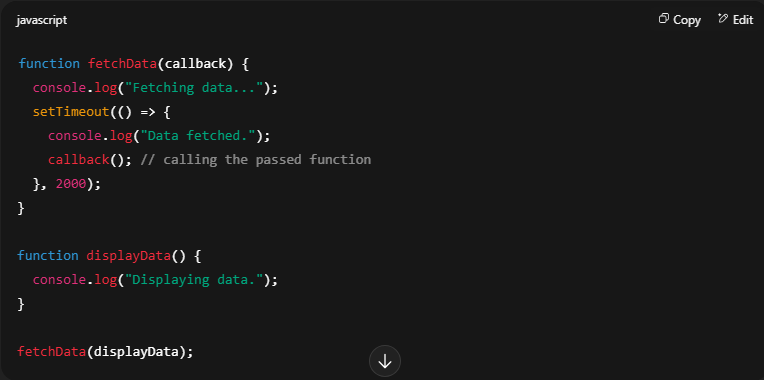 Output:
Fetching data...
Data fetched.
Displaying data.
Key Points:
* A callback is a function passed as an argument
* It allows control after an async task finishes
* Helps in non-blocking, event-driven programming
জাভাস্ক্রিপ্টে callback function হলো এমন একটি ফাংশন, যেটিকে অন্য একটি ফাংশনের আর্গুমেন্ট হিসেবে পাঠানো হয়, এবং সেটি ঐ ফাংশনের কাজ শেষ হওয়ার পর এক্সিকিউট হয়। এটি সাধারণত অ্যাসিনক্রোনাস কাজ (যেমন: API কল, টাইমার, ইভেন্ট) সম্পন্ন হওয়ার পর ফলাফল ব্যবহারের জন্য ব্যবহৃত হয়।
জাভাস্ক্রিপ্টে কলব্যাক ব্যবহারের মাধ্যমে non-blocking আচরণ বজায় রাখা যায়, ফলে ব্রাউজার হ্যাং না করে অন্য কাজ চালিয়ে যেতে পারে।
মূল পয়েন্টসমূহ:
* কলব্যাক হলো একটি ফাংশন, যেটিকে আর্গুমেন্ট হিসেবে পাঠানো হয়
* এটি অ্যাসিনক্রোনাস কাজ শেষ হওয়ার পর এক্সিকিউট হয়
* ইভেন্ট-ড্রিভেন ও নন-ব্লকিং প্রোগ্রামিংয়ে গুরুত্বপূর্ণ ভূমিকা রাখে।
JavaScript uses callbacks to maintain non-blocking behavior, especially in operations that take time, like network requests or file reading.
Code Example:
Output: Fetching data...
Data fetched.
Displaying data.
Key Points:
* A callback is a function passed as an argument
* It allows control after an async task finishes
* Helps in non-blocking, event-driven programming
জাভাস্ক্রিপ্টে callback function হলো এমন একটি ফাংশন, যেটিকে অন্য একটি ফাংশনের আর্গুমেন্ট হিসেবে পাঠানো হয়, এবং সেটি ঐ ফাংশনের কাজ শেষ হওয়ার পর এক্সিকিউট হয়। এটি সাধারণত অ্যাসিনক্রোনাস কাজ (যেমন: API কল, টাইমার, ইভেন্ট) সম্পন্ন হওয়ার পর ফলাফল ব্যবহারের জন্য ব্যবহৃত হয়।
জাভাস্ক্রিপ্টে কলব্যাক ব্যবহারের মাধ্যমে non-blocking আচরণ বজায় রাখা যায়, ফলে ব্রাউজার হ্যাং না করে অন্য কাজ চালিয়ে যেতে পারে।
মূল পয়েন্টসমূহ:
* কলব্যাক হলো একটি ফাংশন, যেটিকে আর্গুমেন্ট হিসেবে পাঠানো হয়
* এটি অ্যাসিনক্রোনাস কাজ শেষ হওয়ার পর এক্সিকিউট হয়
* ইভেন্ট-ড্রিভেন ও নন-ব্লকিং প্রোগ্রামিংয়ে গুরুত্বপূর্ণ ভূমিকা রাখে।
In JavaScript, you return something from a function when you want to pass data or a result back to the caller of the function. The `return` statement is used to send a value out of the function, so that it can be stored, logged, or used elsewhere.
A function without a `return` statement will return `undefined` by default. Returning values is crucial when you want your function to produce output rather than just perform actions.
Code Example: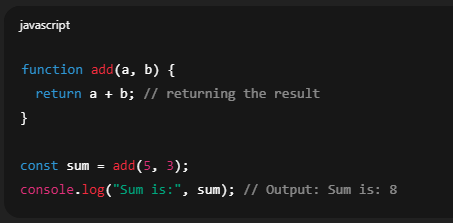 Key Points:
* `return` sends a value back to the function caller
* Function execution stops immediately after `return`
* If `return` is omitted, the function returns `undefined` by default
* Useful for functions that calculate or fetch data
জাভাস্ক্রিপ্টে আপনি যখন চান একটি ফাংশন কোনো ডেটা বা ফলাফল ফিরিয়ে দিক, তখন `return` ব্যবহার করা হয়। `return` স্টেটমেন্ট একটি ভ্যালু ফাংশনের বাইরে পাঠায়, যাতে সেটিকে অন্য কোথাও ব্যবহার, সংরক্ষণ বা প্রিন্ট করা যায়।
যদি কোনো ফাংশনে `return` না থাকে, তাহলে এটি ডিফল্টভাবে `undefined` রিটার্ন করে। এমন ফাংশনের জন্য `return` গুরুত্বপূর্ণ, যেগুলোর উদ্দেশ্য শুধু কাজ করা নয়, ফলাফল প্রদান করাও।
মূল পয়েন্টসমূহ:
* `return` দ্বারা একটি ভ্যালু ফাংশনের কলারকে ফেরত পাঠানো হয়
* `return` এর পরপরই ফাংশন এক্সিকিউশন বন্ধ হয়ে যায়
* `return` না থাকলে ফাংশন `undefined` রিটার্ন করে
* গণনা বা ডেটা ফেচ করার জন্য ব্যবহৃত ফাংশনে `return` অপরিহার্য
A function without a `return` statement will return `undefined` by default. Returning values is crucial when you want your function to produce output rather than just perform actions.
Code Example:
Key Points:* `return` sends a value back to the function caller
* Function execution stops immediately after `return`
* If `return` is omitted, the function returns `undefined` by default
* Useful for functions that calculate or fetch data
জাভাস্ক্রিপ্টে আপনি যখন চান একটি ফাংশন কোনো ডেটা বা ফলাফল ফিরিয়ে দিক, তখন `return` ব্যবহার করা হয়। `return` স্টেটমেন্ট একটি ভ্যালু ফাংশনের বাইরে পাঠায়, যাতে সেটিকে অন্য কোথাও ব্যবহার, সংরক্ষণ বা প্রিন্ট করা যায়।
যদি কোনো ফাংশনে `return` না থাকে, তাহলে এটি ডিফল্টভাবে `undefined` রিটার্ন করে। এমন ফাংশনের জন্য `return` গুরুত্বপূর্ণ, যেগুলোর উদ্দেশ্য শুধু কাজ করা নয়, ফলাফল প্রদান করাও।
মূল পয়েন্টসমূহ:
* `return` দ্বারা একটি ভ্যালু ফাংশনের কলারকে ফেরত পাঠানো হয়
* `return` এর পরপরই ফাংশন এক্সিকিউশন বন্ধ হয়ে যায়
* `return` না থাকলে ফাংশন `undefined` রিটার্ন করে
* গণনা বা ডেটা ফেচ করার জন্য ব্যবহৃত ফাংশনে `return` অপরিহার্য
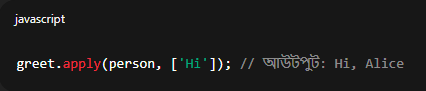
In JavaScript, `bind()`, `call()`, and `apply()` are used to explicitly set the `this` context of a function. All three are methods available on JavaScript functions and are very useful when working with objects and function borrowing.
🔹 `call()` Invokes the function immediately with a specified `this` value and arguments passed individually.
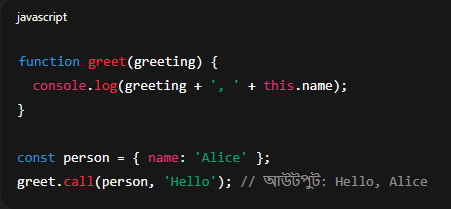 🔹 `apply()` Same as `call()`, but takes arguments as an array.
 🔹 `bind()` Returns a new function with a bound `this` context. It does not execute immediately.
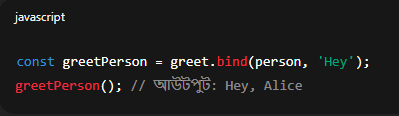 Key Points:
* `call` → immediate invocation with arguments separated
* `apply` → immediate invocation with arguments as array
* `bind` → returns a new function, can be called later
জাভাস্ক্রিপ্টে `bind()`, `call()` এবং `apply()` ব্যবহার করা হয় একটি ফাংশনের `this` কনটেক্সট নির্দিষ্টভাবে সেট করার জন্য। এগুলো ফাংশনের বিল্ট-ইন মেথড এবং অবজেক্ট হ্যান্ডলিং বা ফাংশন বোরো করার ক্ষেত্রে অত্যন্ত গুরুত্বপূর্ণ।
🔹 `call()` ফাংশনকে সাথেসাথেই এক্সিকিউট করে, এবং আর্গুমেন্টগুলো আলাদা আলাদাভাবে পাঠানো হয়।
🔹 `apply()` `call()` এর মতোই কাজ করে, তবে আর্গুমেন্টগুলো একটি array হিসেবে পাঠানো হয়।
🔹 `bind()` একটি নতুন ফাংশন রিটার্ন করে, যেখানে `this` কনটেক্সট বেঁধে দেওয়া হয়, তবে তা সাথে সাথে এক্সিকিউট হয় না।
মূল পয়েন্টসমূহ:
* `call` → সাথে সাথে কল করে, আর্গুমেন্ট আলাদা করে পাঠানো হয়
* `apply` → সাথে সাথে কল করে, আর্গুমেন্ট array হিসেবে পাঠানো হয়
* `bind` → একটি নতুন ফাংশন দেয়, পরে কল করা যায়।
🔹 `call()` Invokes the function immediately with a specified `this` value and arguments passed individually.
🔹 `apply()` Same as `call()`, but takes arguments as an array. 🔹 `bind()` Returns a new function with a bound `this` context. It does not execute immediately. Key Points: * `call` → immediate invocation with arguments separated
* `apply` → immediate invocation with arguments as array
* `bind` → returns a new function, can be called later
জাভাস্ক্রিপ্টে `bind()`, `call()` এবং `apply()` ব্যবহার করা হয় একটি ফাংশনের `this` কনটেক্সট নির্দিষ্টভাবে সেট করার জন্য। এগুলো ফাংশনের বিল্ট-ইন মেথড এবং অবজেক্ট হ্যান্ডলিং বা ফাংশন বোরো করার ক্ষেত্রে অত্যন্ত গুরুত্বপূর্ণ।
🔹 `call()` ফাংশনকে সাথেসাথেই এক্সিকিউট করে, এবং আর্গুমেন্টগুলো আলাদা আলাদাভাবে পাঠানো হয়।
🔹 `apply()` `call()` এর মতোই কাজ করে, তবে আর্গুমেন্টগুলো একটি array হিসেবে পাঠানো হয়।
🔹 `bind()` একটি নতুন ফাংশন রিটার্ন করে, যেখানে `this` কনটেক্সট বেঁধে দেওয়া হয়, তবে তা সাথে সাথে এক্সিকিউট হয় না।
মূল পয়েন্টসমূহ:
* `call` → সাথে সাথে কল করে, আর্গুমেন্ট আলাদা করে পাঠানো হয়
* `apply` → সাথে সাথে কল করে, আর্গুমেন্ট array হিসেবে পাঠানো হয়
* `bind` → একটি নতুন ফাংশন দেয়, পরে কল করা যায়।
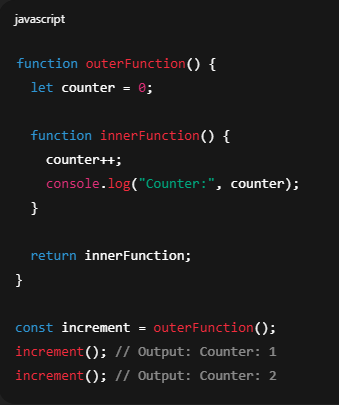
A closure in JavaScript is a function that remembers and has access to variables from its outer lexical scope, even after the outer function has finished executing. Closures are created every time a function is defined inside another function and is returned or assigned.
Closures allow data encapsulation, meaning you can keep variables private and only accessible through a controlled interface.
🔹 How it works:
When a function is returned from another function, it retains access to the scope in which it was created. JavaScript uses lexical scoping, meaning a function looks to the scope where it was defined, not where it was called from.
 JavaScript-এ closure হল এমন একটি ফাংশন, যেটি তার বাইরের স্কোপের ভ্যারিয়েবলগুলো মনে রাখে এবং এক্সেস করতে পারে, এমনকি যখন বাইরের ফাংশনটি এক্সিকিউশন শেষ করে ফেলেছে।
Closure ব্যবহার করে আমরা ডেটা প্রাইভেসি বজায় রাখতে পারি, কারণ বাইরের ভ্যারিয়েবল গুলো শুধুমাত্র ওই ইননার ফাংশনের মাধ্যমেই এক্সেসযোগ্য হয়।
🔹 কিভাবে কাজ করে:
যখন একটি ফাংশন অন্য একটি ফাংশনের ভিতরে ডিফাইন হয় এবং সেটি রিটার্ন করা হয়, তখন এটি নিজের তৈরি হওয়া স্কোপকে মনে রাখে। জাভাস্ক্রিপ্টে lexical scoping ব্যবহৃত হয়, অর্থাৎ ফাংশনটি যেখানে ডিফাইন হয়েছে সেটি দেখে স্কোপ নির্ধারণ করে—not যেখানে কল করা হয়েছে।
🔹 মূল পয়েন্টসমূহ:
- Closure = ফাংশন + তার লেক্সিকাল স্কোপ
- ভ্যারিয়েবলকে প্রাইভেট রাখতে সাহায্য করে
- ফাংশনাল প্রোগ্রামিং, কলব্যাক ও ইভেন্ট হ্যান্ডলারে খুব গুরুত্বপূর্ণ
Closures allow data encapsulation, meaning you can keep variables private and only accessible through a controlled interface.
🔹 How it works:
When a function is returned from another function, it retains access to the scope in which it was created. JavaScript uses lexical scoping, meaning a function looks to the scope where it was defined, not where it was called from.
JavaScript-এ closure হল এমন একটি ফাংশন, যেটি তার বাইরের স্কোপের ভ্যারিয়েবলগুলো মনে রাখে এবং এক্সেস করতে পারে, এমনকি যখন বাইরের ফাংশনটি এক্সিকিউশন শেষ করে ফেলেছে। Closure ব্যবহার করে আমরা ডেটা প্রাইভেসি বজায় রাখতে পারি, কারণ বাইরের ভ্যারিয়েবল গুলো শুধুমাত্র ওই ইননার ফাংশনের মাধ্যমেই এক্সেসযোগ্য হয়।
🔹 কিভাবে কাজ করে:
যখন একটি ফাংশন অন্য একটি ফাংশনের ভিতরে ডিফাইন হয় এবং সেটি রিটার্ন করা হয়, তখন এটি নিজের তৈরি হওয়া স্কোপকে মনে রাখে। জাভাস্ক্রিপ্টে lexical scoping ব্যবহৃত হয়, অর্থাৎ ফাংশনটি যেখানে ডিফাইন হয়েছে সেটি দেখে স্কোপ নির্ধারণ করে—not যেখানে কল করা হয়েছে।
🔹 মূল পয়েন্টসমূহ:
- Closure = ফাংশন + তার লেক্সিকাল স্কোপ
- ভ্যারিয়েবলকে প্রাইভেট রাখতে সাহায্য করে
- ফাংশনাল প্রোগ্রামিং, কলব্যাক ও ইভেন্ট হ্যান্ডলারে খুব গুরুত্বপূর্ণ
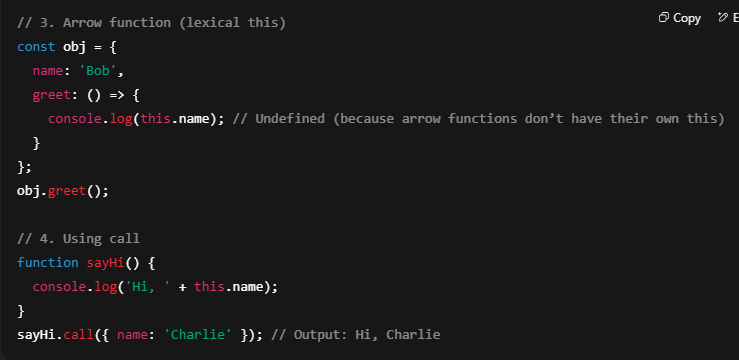
In JavaScript, the this keyword refers to the object from which the function is called, and its value depends on the context in which it is used. It does not refer to the function itself, but to the object that owns the function during execution.
🔹 Explanation:
The value of this changes based on how a function is invoked:
- In a regular function → this refers to the global object (window in browsers).
- Inside a method → this refers to the object that owns the method.
- In arrow functions → this is lexically scoped (it uses the this from the surrounding scope).
- In event handlers → this refers to the DOM element that triggered the event.
- With call(), apply(), or bind() → you can explicitly define what this should refer to.
🔹 Key Points:
- this refers to the execution context
- Arrow functions do not bind their own this
- Context can be controlled using call, apply, or bind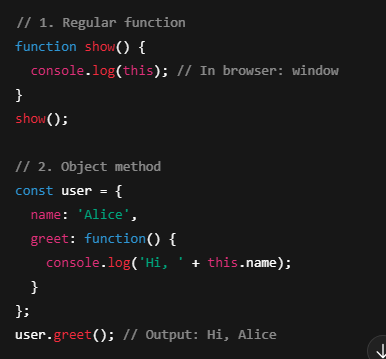
 JavaScript-এ this কীওয়ার্ডটি সেই অবজেক্টকে নির্দেশ করে যেটি থেকে ফাংশনটি কল করা হয়েছে। এটি কখনই ফাংশন নিজেকে বোঝায় না, বরং যেই কনটেক্সটে ফাংশনটি চলছে, সেই অবজেক্টকে বোঝায়।
🔹 ব্যাখ্যা:
this এর মান নির্ভর করে ফাংশনটি কিভাবে কল করা হয়েছে তার ওপর:
- সাধারণ ফাংশনে → this গ্লোবাল অবজেক্টকে বোঝায় (ব্রাউজারে window)
- অবজেক্ট মেথডে → this ঐ অবজেক্টকেই নির্দেশ করে
- Arrow ফাংশনে → this লেক্সিক্যাল স্কোপ থেকে আসে, অর্থাৎ বাইরের this
- Event Handler-এ → this ইভেন্ট টার্গেট DOM এলিমেন্ট বোঝায়
- call(), apply(), bind() দিয়ে → this কে ইচ্ছেমতো সেট করা যায়
🔹 মূল পয়েন্টসমূহ:
- this এক্সিকিউশন কনটেক্সটকে বোঝায়
- Arrow ফাংশনের নিজস্ব this থাকে না
- call, apply, bind দিয়ে this কনট্রোল করা যায়
🔹 Explanation:
The value of this changes based on how a function is invoked:
- In a regular function → this refers to the global object (window in browsers).
- Inside a method → this refers to the object that owns the method.
- In arrow functions → this is lexically scoped (it uses the this from the surrounding scope).
- In event handlers → this refers to the DOM element that triggered the event.
- With call(), apply(), or bind() → you can explicitly define what this should refer to.
🔹 Key Points:
- this refers to the execution context
- Arrow functions do not bind their own this
- Context can be controlled using call, apply, or bind
JavaScript-এ this কীওয়ার্ডটি সেই অবজেক্টকে নির্দেশ করে যেটি থেকে ফাংশনটি কল করা হয়েছে। এটি কখনই ফাংশন নিজেকে বোঝায় না, বরং যেই কনটেক্সটে ফাংশনটি চলছে, সেই অবজেক্টকে বোঝায়। 🔹 ব্যাখ্যা:
this এর মান নির্ভর করে ফাংশনটি কিভাবে কল করা হয়েছে তার ওপর:
- সাধারণ ফাংশনে → this গ্লোবাল অবজেক্টকে বোঝায় (ব্রাউজারে window)
- অবজেক্ট মেথডে → this ঐ অবজেক্টকেই নির্দেশ করে
- Arrow ফাংশনে → this লেক্সিক্যাল স্কোপ থেকে আসে, অর্থাৎ বাইরের this
- Event Handler-এ → this ইভেন্ট টার্গেট DOM এলিমেন্ট বোঝায়
- call(), apply(), bind() দিয়ে → this কে ইচ্ছেমতো সেট করা যায়
🔹 মূল পয়েন্টসমূহ:
- this এক্সিকিউশন কনটেক্সটকে বোঝায়
- Arrow ফাংশনের নিজস্ব this থাকে না
- call, apply, bind দিয়ে this কনট্রোল করা যায়
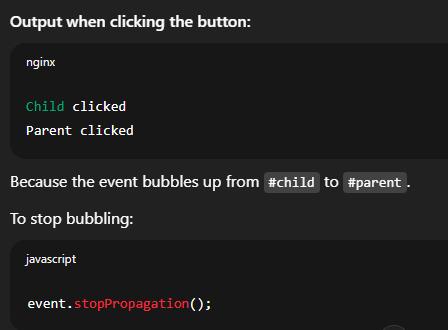
Event bubbling in JavaScript is a type of event propagation where an event starts from the deepest (innermost) target element and then bubbles up to its ancestor elements in the DOM tree. It means that if a child element triggers an event, that same event will also propagate to its parent, grandparent, and so on—unless it’s explicitly stopped.
🔹 Explanation:
When an event occurs on an element (e.g., a button), the event handler for that element runs first. Then the event bubbles up to the parent element, and its handler runs (if defined), and continues up to the root (document).
This behavior allows event delegation, where a single event handler can be placed on a parent to manage events for multiple children.
🔹 Key Points:
- Event flows from child to parent → called bubbling
- Useful for event delegation
- Use event.stopPropagation() to prevent bubbling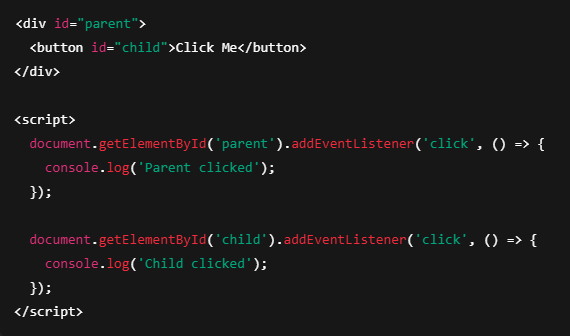
 Event bubbling হল জাভাস্ক্রিপ্টের একটি ইভেন্ট propagation প্রক্রিয়া, যেখানে কোনো ইভেন্ট সবার প্রথমে ইননার/চাইল্ড এলিমেন্টে শুরু হয় এবং তারপর ধাপে ধাপে উপরের প্যারেন্ট এলিমেন্টে পৌঁছায়।
🔹 ব্যাখ্যা:
যখন আপনি একটি ইননার এলিমেন্টে (যেমন: বাটন) ক্লিক করেন, তখন সেই এলিমেন্টের ইভেন্ট হ্যান্ডলার প্রথম এক্সিকিউট হয়। এরপর ইভেন্টটি উপরের প্যারেন্ট এলিমেন্টে যায় এবং সেখানকার ইভেন্ট হ্যান্ডলার চালু হয়, এবং এভাবে এটি পুরো DOM tree-তে উপরের দিকে যেতে থাকে—যদি না তা থামানো হয়।
এই মেকানিজম ইভেন্ট ডেলিগেশনের জন্য খুব উপযোগী, যেখানে প্যারেন্টের উপর একটি ইভেন্ট হ্যান্ডলার বসিয়েই চাইল্ডদের ইভেন্ট হ্যান্ডল করা যায়।
🔹 মূল পয়েন্টসমূহ:
- চাইল্ড এলিমেন্ট থেকে প্যারেন্টে ইভেন্ট ছড়িয়ে পড়ে → এটিই bubbling
- ইভেন্ট ডেলিগেশনের জন্য খুব কার্যকর
- event.stopPropagation() দিয়ে ইভেন্ট বাবলিং বন্ধ করা যায়
🔹 Explanation:
When an event occurs on an element (e.g., a button), the event handler for that element runs first. Then the event bubbles up to the parent element, and its handler runs (if defined), and continues up to the root (document).
This behavior allows event delegation, where a single event handler can be placed on a parent to manage events for multiple children.
🔹 Key Points:
- Event flows from child to parent → called bubbling
- Useful for event delegation
- Use event.stopPropagation() to prevent bubbling
Event bubbling হল জাভাস্ক্রিপ্টের একটি ইভেন্ট propagation প্রক্রিয়া, যেখানে কোনো ইভেন্ট সবার প্রথমে ইননার/চাইল্ড এলিমেন্টে শুরু হয় এবং তারপর ধাপে ধাপে উপরের প্যারেন্ট এলিমেন্টে পৌঁছায়। 🔹 ব্যাখ্যা:
যখন আপনি একটি ইননার এলিমেন্টে (যেমন: বাটন) ক্লিক করেন, তখন সেই এলিমেন্টের ইভেন্ট হ্যান্ডলার প্রথম এক্সিকিউট হয়। এরপর ইভেন্টটি উপরের প্যারেন্ট এলিমেন্টে যায় এবং সেখানকার ইভেন্ট হ্যান্ডলার চালু হয়, এবং এভাবে এটি পুরো DOM tree-তে উপরের দিকে যেতে থাকে—যদি না তা থামানো হয়।
এই মেকানিজম ইভেন্ট ডেলিগেশনের জন্য খুব উপযোগী, যেখানে প্যারেন্টের উপর একটি ইভেন্ট হ্যান্ডলার বসিয়েই চাইল্ডদের ইভেন্ট হ্যান্ডল করা যায়।
🔹 মূল পয়েন্টসমূহ:
- চাইল্ড এলিমেন্ট থেকে প্যারেন্টে ইভেন্ট ছড়িয়ে পড়ে → এটিই bubbling
- ইভেন্ট ডেলিগেশনের জন্য খুব কার্যকর
- event.stopPropagation() দিয়ে ইভেন্ট বাবলিং বন্ধ করা যায়
The Event Loop in JavaScript is a fundamental concept that enables non-blocking, asynchronous behavior, even though JavaScript is single-threaded. It allows the JavaScript runtime to handle multiple operations concurrently without blocking the main thread.
🔹 Explanation:
JavaScript has:
- A Call Stack for executing synchronous code
- A Web API environment (provided by the browser) for handling asynchronous tasks (like setTimeout, DOM events, or fetch requests)
- A Callback Queue where asynchronous callbacks wait
- The Event Loop, which constantly checks if the call stack is empty, and if so, it pushes the next callback from the queue to the stack for execution
This is how JavaScript executes asynchronous code without blocking the UI or other logic.
🔹 Key Points:
- JavaScript is single-threaded but non-blocking
- Event loop moves async callbacks to the call stack
- Enables concurrency using queue and timing mechanisms
🔹 Code Explanation: Even though the timer is 0 ms, the setTimeout callback goes to the Web API, then to the queue, and is only executed after the call stack is empty (i.e., after "End" is printed). This shows how the Event Loop works.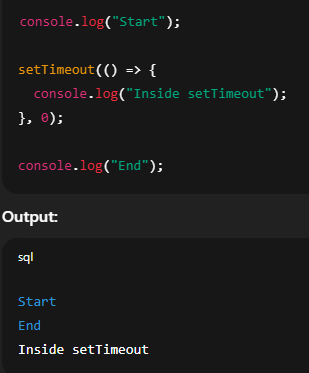 🔹 কোডের ব্যাখ্যা: setTimeout এ 0 ms দিলেও সেটি Call Stack-এ এক্সিকিউট হয় না। প্রথমে এটি Web API তে যায়, তারপর Callback Queue-তে, এবং সবশেষে Call Stack খালি হলে Event Loop সেটিকে Stack-এ আনে। তাই "Inside setTimeout" পরে আসে।
Event Loop হল জাভাস্ক্রিপ্টের একটি মৌলিক কনসেপ্ট, যা একক থ্রেডে চলেও অ্যাসিনক্রোনাস ও নন-ব্লকিং আচরণ সম্ভব করে। এটি একাধিক অপারেশন একসাথে পরিচালনা করতে সাহায্য করে, মূল থ্রেডকে ব্লক না করেই।
🔹 ব্যাখ্যা:
JavaScript এ থাকে:
- একটি Call Stack, যা সিঙ্ক্রোনাস কোড এক্সিকিউট করে
- একটি Web API Environment (ব্রাউজার প্রদান করে), যা টাইমার, ইভেন্ট, ফেচ ইত্যাদি অ্যাসিনক্রোনাস টাস্ক পরিচালনা করে
- একটি Callback Queue, যেখানে অ্যাসিনক্রোনাস ফাংশনগুলোর কলব্যাক অপেক্ষা করে
- একটি Event Loop, যা সারাক্ষণ চেক করে Call Stack খালি কিনা। খালি হলে Callback Queue থেকে ফাংশন তুলে এনে Stack-এ রাখে এক্সিকিউশনের জন্য
এই প্রক্রিয়ার মাধ্যমে JavaScript UI ব্লক না করেই অ্যাসিনক্রোনাস কোড চালাতে পারে।
🔹 মূল পয়েন্টসমূহ:
- JavaScript একক থ্রেডে চলে, কিন্তু নন-ব্লকিং
- Event Loop Call Stack খালি হলে Callback Queue থেকে কোড এনে চালায়
- এটি অ্যাসিনক্রোনাস ও কনকারেন্ট আচরণ নিশ্চিত করে
🔹 Explanation:
JavaScript has:
- A Call Stack for executing synchronous code
- A Web API environment (provided by the browser) for handling asynchronous tasks (like setTimeout, DOM events, or fetch requests)
- A Callback Queue where asynchronous callbacks wait
- The Event Loop, which constantly checks if the call stack is empty, and if so, it pushes the next callback from the queue to the stack for execution
This is how JavaScript executes asynchronous code without blocking the UI or other logic.
🔹 Key Points:
- JavaScript is single-threaded but non-blocking
- Event loop moves async callbacks to the call stack
- Enables concurrency using queue and timing mechanisms
🔹 Code Explanation: Even though the timer is 0 ms, the setTimeout callback goes to the Web API, then to the queue, and is only executed after the call stack is empty (i.e., after "End" is printed). This shows how the Event Loop works.
🔹 কোডের ব্যাখ্যা: setTimeout এ 0 ms দিলেও সেটি Call Stack-এ এক্সিকিউট হয় না। প্রথমে এটি Web API তে যায়, তারপর Callback Queue-তে, এবং সবশেষে Call Stack খালি হলে Event Loop সেটিকে Stack-এ আনে। তাই "Inside setTimeout" পরে আসে। Event Loop হল জাভাস্ক্রিপ্টের একটি মৌলিক কনসেপ্ট, যা একক থ্রেডে চলেও অ্যাসিনক্রোনাস ও নন-ব্লকিং আচরণ সম্ভব করে। এটি একাধিক অপারেশন একসাথে পরিচালনা করতে সাহায্য করে, মূল থ্রেডকে ব্লক না করেই।
🔹 ব্যাখ্যা:
JavaScript এ থাকে:
- একটি Call Stack, যা সিঙ্ক্রোনাস কোড এক্সিকিউট করে
- একটি Web API Environment (ব্রাউজার প্রদান করে), যা টাইমার, ইভেন্ট, ফেচ ইত্যাদি অ্যাসিনক্রোনাস টাস্ক পরিচালনা করে
- একটি Callback Queue, যেখানে অ্যাসিনক্রোনাস ফাংশনগুলোর কলব্যাক অপেক্ষা করে
- একটি Event Loop, যা সারাক্ষণ চেক করে Call Stack খালি কিনা। খালি হলে Callback Queue থেকে ফাংশন তুলে এনে Stack-এ রাখে এক্সিকিউশনের জন্য
এই প্রক্রিয়ার মাধ্যমে JavaScript UI ব্লক না করেই অ্যাসিনক্রোনাস কোড চালাতে পারে।
🔹 মূল পয়েন্টসমূহ:
- JavaScript একক থ্রেডে চলে, কিন্তু নন-ব্লকিং
- Event Loop Call Stack খালি হলে Callback Queue থেকে কোড এনে চালায়
- এটি অ্যাসিনক্রোনাস ও কনকারেন্ট আচরণ নিশ্চিত করে
Hoisting in JavaScript is a default behavior where variable and function declarations are moved to the top of their scope (either the global scope or the function scope) during the compilation phase—before code execution begins.
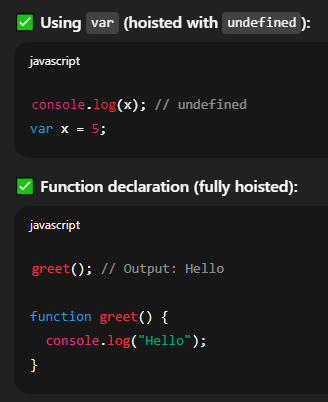
This means you can use functions and variables before they are actually declared in the code. However, only the declarations are hoisted, not the initializations.
🔹 Explanation:
JavaScript's engine processes the code in two phases:
- Compilation phase – All variable and function declarations are hoisted to the top of their scope.
- Execution phase – Code is executed line by line.
- Function declarations are fully hoisted with their body.
- Variables declared with var are hoisted with undefined as initial value.
- Variables declared with let and const are also hoisted, but stay in a Temporal Dead Zone (TDZ) and throw a ReferenceError if accessed before declaration.
🔹 Key Points:
- Hoisting moves declarations (not initializations) to top
- var is hoisted with undefined
- let and const are hoisted but not accessible before declaration (TDZ)
- Function declarations are fully hoisted
 JavaScript-এ Hoisting হলো একটি ডিফল্ট আচরণ, যেখানে ভ্যারিয়েবল এবং ফাংশন ডিক্লারেশনগুলো তাদের স্কোপের উপরে তুলে নেওয়া হয়—কোড এক্সিকিউশনের আগেই (কম্পাইলেশন ফেজে)।
এর মানে হলো আপনি কোডে যেখানেই ভ্যারিয়েবল বা ফাংশন ডিক্লার করেন না কেন, JavaScript ইঞ্জিন তা উপরে নিয়ে যায়। তবে মনে রাখতে হবে, ডিক্লারেশন ওঠে, ভ্যালু অ্যাসাইনমেন্ট ওঠে না।
🔹 ব্যাখ্যা:
JavaScript ইঞ্জিন দুই ধাপে কোড প্রসেস করে:
- কম্পাইলেশন ফেজ: ডিক্লারেশনগুলো স্কোপের উপরে ওঠানো হয়
- এক্সিকিউশন ফেজ: কোড লাইন বাই লাইন চালানো হয়
- Function declarations পুরোপুরি hoist হয় (বডিসহ)
- var hoist হয় undefined নিয়ে
- let ও const hoist হয় কিন্তু TDZ (Temporal Dead Zone) এ থাকে, এবং আগে অ্যাক্সেস করলে ReferenceError দেয়
🔹 মূল পয়েন্টসমূহ:
- Hoisting মানে ডিক্লারেশনগুলো উপরে তোলা হয়
- var → hoist হয় undefined দিয়ে
- let, const → hoist হয় কিন্তু আগে অ্যাক্সেস করলে error
- Function declarations পুরোপুরি hoist হয়
This means you can use functions and variables before they are actually declared in the code. However, only the declarations are hoisted, not the initializations.
🔹 Explanation:
JavaScript's engine processes the code in two phases:
- Compilation phase – All variable and function declarations are hoisted to the top of their scope.
- Execution phase – Code is executed line by line.
- Function declarations are fully hoisted with their body.
- Variables declared with var are hoisted with undefined as initial value.
- Variables declared with let and const are also hoisted, but stay in a Temporal Dead Zone (TDZ) and throw a ReferenceError if accessed before declaration.
🔹 Key Points:
- Hoisting moves declarations (not initializations) to top
- var is hoisted with undefined
- let and const are hoisted but not accessible before declaration (TDZ)
- Function declarations are fully hoisted
JavaScript-এ Hoisting হলো একটি ডিফল্ট আচরণ, যেখানে ভ্যারিয়েবল এবং ফাংশন ডিক্লারেশনগুলো তাদের স্কোপের উপরে তুলে নেওয়া হয়—কোড এক্সিকিউশনের আগেই (কম্পাইলেশন ফেজে)। এর মানে হলো আপনি কোডে যেখানেই ভ্যারিয়েবল বা ফাংশন ডিক্লার করেন না কেন, JavaScript ইঞ্জিন তা উপরে নিয়ে যায়। তবে মনে রাখতে হবে, ডিক্লারেশন ওঠে, ভ্যালু অ্যাসাইনমেন্ট ওঠে না।
🔹 ব্যাখ্যা:
JavaScript ইঞ্জিন দুই ধাপে কোড প্রসেস করে:
- কম্পাইলেশন ফেজ: ডিক্লারেশনগুলো স্কোপের উপরে ওঠানো হয়
- এক্সিকিউশন ফেজ: কোড লাইন বাই লাইন চালানো হয়
- Function declarations পুরোপুরি hoist হয় (বডিসহ)
- var hoist হয় undefined নিয়ে
- let ও const hoist হয় কিন্তু TDZ (Temporal Dead Zone) এ থাকে, এবং আগে অ্যাক্সেস করলে ReferenceError দেয়
🔹 মূল পয়েন্টসমূহ:
- Hoisting মানে ডিক্লারেশনগুলো উপরে তোলা হয়
- var → hoist হয় undefined দিয়ে
- let, const → hoist হয় কিন্তু আগে অ্যাক্সেস করলে error
- Function declarations পুরোপুরি hoist হয়
A recursive function is a function that calls itself directly or indirectly in order to solve a problem by breaking it down into smaller sub-problems of the same type. It is commonly used for tasks like tree traversal, factorial calculation, Fibonacci sequence, etc.
Every recursive function must have:
- A base case – a condition under which the recursion stops
- A recursive case – where the function calls itself with a smaller or simpler input
🔹 Explanation:
Recursion works by pushing function calls onto the call stack until the base condition is met, and then resolving them in reverse order (LIFO – Last In, First Out).
🔹 Key Points:
- Function that calls itself
- Must include a base case to prevent infinite recursion
- Useful in divide-and-conquer problems
- Can be memory intensive if not optimized (e.g., tail call)
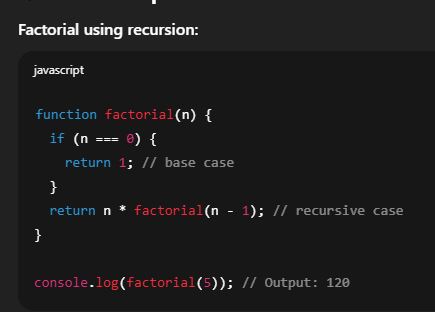 Recursive function হলো একটি ফাংশন, যা নিজেই নিজেকে কল করে, যাতে একটি বড় সমস্যা ছোট ছোট একই ধরনের সাব-সমস্যায় ভাগ করে সমাধান করা যায়। এটি সাধারণত ব্যবহার করা হয় ট্রি ট্রাভার্সাল, ফ্যাক্টোরিয়াল, ফিবোনাচ্চি সিরিজ ইত্যাদি ক্ষেত্রে।
প্রতিটি recursive function-এর দুটি অংশ থাকা বাধ্যতামূলক:
- Base case – যেটি recursion থামাবে
- Recursive case – যেটি ফাংশনকে নিজেই আবার কল করবে
🔹 ব্যাখ্যা:
Recursion কাজ করে Call Stack এর মাধ্যমে। যতক্ষণ না base case মিলে, ফাংশন একাধিকবার stack-এ push হয়, এবং base case পাওয়ার পর ধাপে ধাপে রেজাল্ট রিটার্ন হতে থাকে (LIFO পদ্ধতিতে)।
🔹 মূল পয়েন্টসমূহ:
- নিজেকে নিজেই কল করে এমন ফাংশন
- Base case থাকতে হবে না হলে infinite recursion হবে
- Divide-and-conquer সমস্যায় খুব কার্যকর
- সঠিকভাবে ব্যবহৃত না হলে Stack Overflow হতে পারে
Every recursive function must have:
- A base case – a condition under which the recursion stops
- A recursive case – where the function calls itself with a smaller or simpler input
🔹 Explanation:
Recursion works by pushing function calls onto the call stack until the base condition is met, and then resolving them in reverse order (LIFO – Last In, First Out).
🔹 Key Points:
- Function that calls itself
- Must include a base case to prevent infinite recursion
- Useful in divide-and-conquer problems
- Can be memory intensive if not optimized (e.g., tail call)
Recursive function হলো একটি ফাংশন, যা নিজেই নিজেকে কল করে, যাতে একটি বড় সমস্যা ছোট ছোট একই ধরনের সাব-সমস্যায় ভাগ করে সমাধান করা যায়। এটি সাধারণত ব্যবহার করা হয় ট্রি ট্রাভার্সাল, ফ্যাক্টোরিয়াল, ফিবোনাচ্চি সিরিজ ইত্যাদি ক্ষেত্রে।প্রতিটি recursive function-এর দুটি অংশ থাকা বাধ্যতামূলক:
- Base case – যেটি recursion থামাবে
- Recursive case – যেটি ফাংশনকে নিজেই আবার কল করবে
🔹 ব্যাখ্যা:
Recursion কাজ করে Call Stack এর মাধ্যমে। যতক্ষণ না base case মিলে, ফাংশন একাধিকবার stack-এ push হয়, এবং base case পাওয়ার পর ধাপে ধাপে রেজাল্ট রিটার্ন হতে থাকে (LIFO পদ্ধতিতে)।
🔹 মূল পয়েন্টসমূহ:
- নিজেকে নিজেই কল করে এমন ফাংশন
- Base case থাকতে হবে না হলে infinite recursion হবে
- Divide-and-conquer সমস্যায় খুব কার্যকর
- সঠিকভাবে ব্যবহৃত না হলে Stack Overflow হতে পারে
In JavaScript, both undefined and null represent the absence of a value, but they are not the same and are used in different contexts.
- undefined means a variable that has been declared but not assigned a value.
- null means an intentional absence of any object value.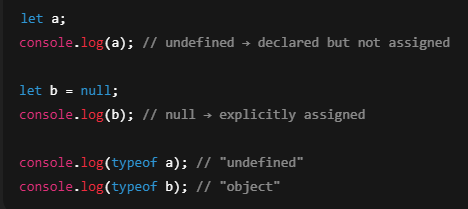 JavaScript-এ undefined এবং null দুটোই ভ্যালু অনুপস্থিতির নির্দেশ দেয়, তবে এদের অর্থ এবং ব্যবহার আলাদা।
- undefined অর্থ ভ্যারিয়েবল ডিক্লেয়ার করা হয়েছে কিন্তু ভ্যালু অ্যাসাইন করা হয়নি
- null ইচ্ছাকৃতভাবে "কোনো ভ্যালু নেই" বোঝাতে ব্যবহার করা হয়।
- undefined means a variable that has been declared but not assigned a value.
- null means an intentional absence of any object value.
JavaScript-এ undefined এবং null দুটোই ভ্যালু অনুপস্থিতির নির্দেশ দেয়, তবে এদের অর্থ এবং ব্যবহার আলাদা। - undefined অর্থ ভ্যারিয়েবল ডিক্লেয়ার করা হয়েছে কিন্তু ভ্যালু অ্যাসাইন করা হয়নি
- null ইচ্ছাকৃতভাবে "কোনো ভ্যালু নেই" বোঝাতে ব্যবহার করা হয়।
JavaScript provides two categories of data types:
🔹 1. Primitive Data Types
These are immutable and store single values.
String – Text data
Number – Integer or floating-point
Boolean – true or false
Undefined – Declared but not assigned
Null – Explicitly no value
Symbol – Unique identifiers (ES6)
BigInt – For large integers (ES2020)
🔹 2. Non-Primitive (Reference) Data Types
These hold collections or complex values.
Object – Collection of key-value pairs
Array – Ordered list of values
Function – Callable object
JavaScript-এ মোট দুই ধরনের ডেটা টাইপ রয়েছে:
🔹 ১. Primitive Data Types
এগুলো অপরিবর্তনযোগ্য (immutable) এবং একক মান ধারণ করে।
String – টেক্সট ডেটা
Number – সংখ্যা (ইনটিজার বা দশমিক)
Boolean – true বা false
Undefined – ডিক্লেয়ার করা হয়েছে কিন্তু ভ্যালু অ্যাসাইন হয়নি
Null – ইচ্ছাকৃতভাবে ফাঁকা ভ্যালু
Symbol – ইউনিক আইডেন্টিফায়ার (ES6)
BigInt – অনেক বড় সংখ্যা ধারণের জন্য (ES2020)
🔹 ২. Non-Primitive (Reference) Data Types
এগুলো জটিল বা একাধিক মান ধারণ করে।
Object – কী-ভ্যালু জোড়ার সংগ্রহ
Array – একাধিক মানের লিস্ট
Function – কলযোগ্য অবজেক্ট
🔹 1. Primitive Data Types
These are immutable and store single values.
String – Text data
Number – Integer or floating-point
Boolean – true or false
Undefined – Declared but not assigned
Null – Explicitly no value
Symbol – Unique identifiers (ES6)
BigInt – For large integers (ES2020)
🔹 2. Non-Primitive (Reference) Data Types
These hold collections or complex values.
Object – Collection of key-value pairs
Array – Ordered list of values
Function – Callable object
JavaScript-এ মোট দুই ধরনের ডেটা টাইপ রয়েছে:
🔹 ১. Primitive Data Types
এগুলো অপরিবর্তনযোগ্য (immutable) এবং একক মান ধারণ করে।
String – টেক্সট ডেটা
Number – সংখ্যা (ইনটিজার বা দশমিক)
Boolean – true বা false
Undefined – ডিক্লেয়ার করা হয়েছে কিন্তু ভ্যালু অ্যাসাইন হয়নি
Null – ইচ্ছাকৃতভাবে ফাঁকা ভ্যালু
Symbol – ইউনিক আইডেন্টিফায়ার (ES6)
BigInt – অনেক বড় সংখ্যা ধারণের জন্য (ES2020)
🔹 ২. Non-Primitive (Reference) Data Types
এগুলো জটিল বা একাধিক মান ধারণ করে।
Object – কী-ভ্যালু জোড়ার সংগ্রহ
Array – একাধিক মানের লিস্ট
Function – কলযোগ্য অবজেক্ট
DOM stands for Document Object Model. It is a tree-like structure that the browser creates from your HTML. Every tag in HTML (like `div`, `p`, `h1`) becomes a node or object in this tree.
With JavaScript, we can use the DOM to:
* Read or change the text on a web page
* Add or remove elements
* Change styles (like color, size)
* Handle user actions like clicks
The DOM lets JavaScript control and change the content and structure of a web page while it's running, without needing to reload the page.
🔹 Key Points:
* DOM is the way a web page is shown in the browser as objects
* JavaScript uses DOM to change the page without reloading
* It helps make websites dynamic and interactive
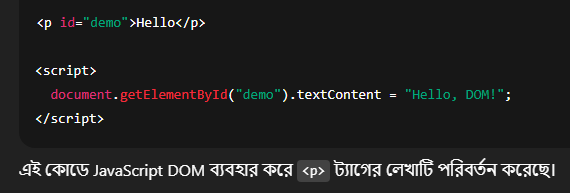 DOM বা Document Object Model হলো একটি গাছের (tree) মতো গঠন, যেটি ব্রাউজার HTML কোড থেকে তৈরি করে। প্রতিটি HTML ট্যাগ (যেমন `div`, p`, `h1`) DOM-এ একটি নোড (node) বা অবজেক্ট হিসেবে থাকে।
JavaScript ব্যবহার করে DOM-এর মাধ্যমে আমরা:
* কোনো টেক্সট পড়তে বা পরিবর্তন করতে পারি
* নতুন HTML এলিমেন্ট যোগ বা মুছতে পারি
* স্টাইল (যেমন রঙ, সাইজ) পরিবর্তন করতে পারি
* ক্লিক বা টাইপ করার মতো ইউজার অ্যাকশনের প্রতিক্রিয়া জানাতে পারি
এইভাবে DOM ও JavaScript একসাথে ওয়েবসাইটকে ডাইনামিক এবং ইন্টারঅ্যাকটিভ করে তোলে।
🔹 মূল পয়েন্টসমূহ:
* DOM হলো ব্রাউজারের তৈরি HTML কাঠামোর একটি গাছের মতো রূপ
* JavaScript দিয়ে DOM ব্যবহার করে পেজ রিলোড না করেই কনটেন্ট ও স্টাইল পরিবর্তন করা যায়
* এটি ওয়েবপেজকে ডাইনামিক ও ইন্টারঅ্যাকটিভ করতে সাহায্য করে
With JavaScript, we can use the DOM to:
* Read or change the text on a web page
* Add or remove elements
* Change styles (like color, size)
* Handle user actions like clicks
The DOM lets JavaScript control and change the content and structure of a web page while it's running, without needing to reload the page.
🔹 Key Points:
* DOM is the way a web page is shown in the browser as objects
* JavaScript uses DOM to change the page without reloading
* It helps make websites dynamic and interactive
DOM বা Document Object Model হলো একটি গাছের (tree) মতো গঠন, যেটি ব্রাউজার HTML কোড থেকে তৈরি করে। প্রতিটি HTML ট্যাগ (যেমন `div`, p`, `h1`) DOM-এ একটি নোড (node) বা অবজেক্ট হিসেবে থাকে।JavaScript ব্যবহার করে DOM-এর মাধ্যমে আমরা:
* কোনো টেক্সট পড়তে বা পরিবর্তন করতে পারি
* নতুন HTML এলিমেন্ট যোগ বা মুছতে পারি
* স্টাইল (যেমন রঙ, সাইজ) পরিবর্তন করতে পারি
* ক্লিক বা টাইপ করার মতো ইউজার অ্যাকশনের প্রতিক্রিয়া জানাতে পারি
এইভাবে DOM ও JavaScript একসাথে ওয়েবসাইটকে ডাইনামিক এবং ইন্টারঅ্যাকটিভ করে তোলে।
🔹 মূল পয়েন্টসমূহ:
* DOM হলো ব্রাউজারের তৈরি HTML কাঠামোর একটি গাছের মতো রূপ
* JavaScript দিয়ে DOM ব্যবহার করে পেজ রিলোড না করেই কনটেন্ট ও স্টাইল পরিবর্তন করা যায়
* এটি ওয়েবপেজকে ডাইনামিক ও ইন্টারঅ্যাকটিভ করতে সাহায্য করে
JavaScript is a *dynamic* type language.
This means you don’t have to define the data type of a variable when you declare it. The type is automatically decided at runtime, based on the value assigned.
🔹 Explanation:
In dynamic typing, the variable type can change during execution.
You can assign a string to a variable, and later assign a number to the same variable without any error.
🔹 Key Points:
* JavaScript is dynamically typed
* Variable type is decided at runtime, not at compile time
* More flexible but can cause type-related bugs
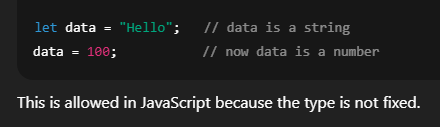 JavaScript একটি *dynamic* type ভাষা।
এর মানে হলো, ভ্যারিয়েবল ডিক্লেয়ার করার সময় ডেটা টাইপ বলে দিতে হয় না। JavaScript নিজে থেকেই ভ্যালু দেখে টাইপ নির্ধারণ করে।
🔹 ব্যাখ্যা:
Dynamic typing এ, একটি ভ্যারিয়েবলের টাইপ এক্সিকিউশনের সময় পরিবর্তন হতে পারে।
আপনি একই ভ্যারিয়েবলে কখনো স্ট্রিং, আবার কখনো সংখ্যা রাখতে পারেন।
🔹 মূল পয়েন্টসমূহ:
* JavaScript হল dynamically typed
* টাইপ নির্ধারিত হয় রানটাইমে, কম্পাইল টাইমে নয়
* ব্যবহার সহজ, তবে টাইপ সম্পর্কিত বাগের ঝুঁকি থাকে
This means you don’t have to define the data type of a variable when you declare it. The type is automatically decided at runtime, based on the value assigned.
🔹 Explanation:
In dynamic typing, the variable type can change during execution.
You can assign a string to a variable, and later assign a number to the same variable without any error.
🔹 Key Points:
* JavaScript is dynamically typed
* Variable type is decided at runtime, not at compile time
* More flexible but can cause type-related bugs
JavaScript একটি *dynamic* type ভাষা। এর মানে হলো, ভ্যারিয়েবল ডিক্লেয়ার করার সময় ডেটা টাইপ বলে দিতে হয় না। JavaScript নিজে থেকেই ভ্যালু দেখে টাইপ নির্ধারণ করে।
🔹 ব্যাখ্যা:
Dynamic typing এ, একটি ভ্যারিয়েবলের টাইপ এক্সিকিউশনের সময় পরিবর্তন হতে পারে।
আপনি একই ভ্যারিয়েবলে কখনো স্ট্রিং, আবার কখনো সংখ্যা রাখতে পারেন।
🔹 মূল পয়েন্টসমূহ:
* JavaScript হল dynamically typed
* টাইপ নির্ধারিত হয় রানটাইমে, কম্পাইল টাইমে নয়
* ব্যবহার সহজ, তবে টাইপ সম্পর্কিত বাগের ঝুঁকি থাকে
A variable in programming is like a container that holds a value or data. It has a name and can store different information, allowing developers to work with and manipulate data in their programs.
প্রোগ্রামিংয়ে ভেরিয়েবল একটি কন্টেইনার হিসেবে কাজ করে যা একটি ভেলু বা ডেটা ধারণ করে। এর একটি নাম থাকে এবং এটি বিভিন্ন তথ্য সংরক্ষণ করতে পারে, যা ডেভেলপারদের তাদের প্রোগ্রামে ডেটার সাথে কাজ করতে এবং তা পরিবর্তন করতে সহায়তা করে।
প্রোগ্রামিংয়ে ভেরিয়েবল একটি কন্টেইনার হিসেবে কাজ করে যা একটি ভেলু বা ডেটা ধারণ করে। এর একটি নাম থাকে এবং এটি বিভিন্ন তথ্য সংরক্ষণ করতে পারে, যা ডেভেলপারদের তাদের প্রোগ্রামে ডেটার সাথে কাজ করতে এবং তা পরিবর্তন করতে সহায়তা করে।
Compiler and interpreter are two types of programs that translate source code (written by humans) into machine code (understood by computers), but they do it in different ways.
🔹 Compiler:
* A compiler translates the entire code at once before running it
* If there are errors, it shows them all at once before execution
* After compiling, it creates a separate executable file
✅ Example languages: C, C++, Java (uses both)
🔹 Interpreter:
* An interpreter executes the code line-by-line
* It stops immediately when an error is found
* No separate executable file is created
✅ Example languages: JavaScript, Python
🔹 JavaScript is interpreted. When you run JavaScript in the browser, it reads and runs one line at a time. If a line has an error, the rest is not executed.
Compiler এবং Interpreter হলো দুটি প্রোগ্রাম, যেগুলো মানুষের লেখা সোর্স কোডকে মেশিন কোডে রূপান্তর করে। তবে, তারা কাজটি ভিন্নভাবে করে।
🔹 Compiler:
* পুরো কোড একবারে অনুবাদ করে রান করার আগে
* সবগুলো ভুল একসাথে দেখায়
* একটি আলাদা executable ফাইল তৈরি করে
✅ উদাহরণ: C, C++, Java (দুটোই ব্যবহার করে)
🔹 Interpreter:
* কোডটি লাইন বাই লাইন এক্সিকিউট করে
* ভুল পেলে সেখানেই থেমে যায়
* কোনো ফাইল তৈরি হয় না, সরাসরি এক্সিকিউশন হয়
✅ উদাহরণ: JavaScript, Python
🔹 JavaScript একটি interpreted language। যখন আপনি ব্রাউজারে JavaScript চালান, তখন এটি লাইন বাই লাইন পড়ে এবং চালায়। কোনো লাইনে ভুল থাকলে সেখানেই থেমে যায়।
🔹 Compiler:
* A compiler translates the entire code at once before running it
* If there are errors, it shows them all at once before execution
* After compiling, it creates a separate executable file
✅ Example languages: C, C++, Java (uses both)
🔹 Interpreter:
* An interpreter executes the code line-by-line
* It stops immediately when an error is found
* No separate executable file is created
✅ Example languages: JavaScript, Python
🔹 JavaScript is interpreted. When you run JavaScript in the browser, it reads and runs one line at a time. If a line has an error, the rest is not executed.
Compiler এবং Interpreter হলো দুটি প্রোগ্রাম, যেগুলো মানুষের লেখা সোর্স কোডকে মেশিন কোডে রূপান্তর করে। তবে, তারা কাজটি ভিন্নভাবে করে।
🔹 Compiler:
* পুরো কোড একবারে অনুবাদ করে রান করার আগে
* সবগুলো ভুল একসাথে দেখায়
* একটি আলাদা executable ফাইল তৈরি করে
✅ উদাহরণ: C, C++, Java (দুটোই ব্যবহার করে)
🔹 Interpreter:
* কোডটি লাইন বাই লাইন এক্সিকিউট করে
* ভুল পেলে সেখানেই থেমে যায়
* কোনো ফাইল তৈরি হয় না, সরাসরি এক্সিকিউশন হয়
✅ উদাহরণ: JavaScript, Python
🔹 JavaScript একটি interpreted language। যখন আপনি ব্রাউজারে JavaScript চালান, তখন এটি লাইন বাই লাইন পড়ে এবং চালায়। কোনো লাইনে ভুল থাকলে সেখানেই থেমে যায়।
Scope means where a variable is accessible in your code.
It defines the visibility or lifetime of a variable—where you can use it and where you cannot.
There are three main types of scope in JavaScript:
🔹 1. Global Scope
* Variables declared outside of any function or block
* Can be accessed from anywhere in the code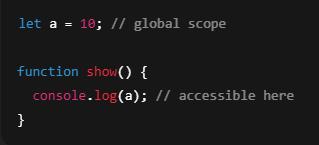 🔹 2. Function Scope
* Variables declared inside a function
* Can only be accessed within that function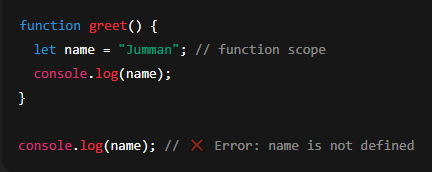 🔹 3. Block Scope
* Variables declared with `let` or `const` inside ``
* Accessible only inside that block
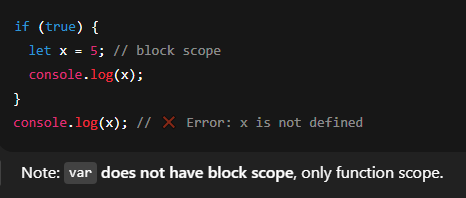 🔹 Key Points:
* Global scope → accessible everywhere
* Function scope → accessible only inside the function
* Block scope → accessible only inside `` with `let` or `const`
* `var` is not block-scoped, use `let` or `const` for safer code
Scope মানে হলো, কোথা থেকে কোনো ভ্যারিয়েবল অ্যাক্সেস করা যাবে।
Scope নির্ধারণ করে ভ্যারিয়েবল কতটুকু জায়গায় কাজ করবে বা দেখা যাবে।
JavaScript-এ তিন ধরণের Scope আছে:
🔹 ১. Global Scope
* যখন ভ্যারিয়েবল ফাংশনের বাইরে ডিক্লেয়ার করা হয়
* এটি সব জায়গা থেকে অ্যাক্সেস করা যায়
🔹 ২. Function Scope
* যখন ভ্যারিয়েবল ফাংশনের ভিতরে ডিক্লেয়ার করা হয়
* এটি শুধু সেই ফাংশনের ভিতরেই কাজ করে
🔹 ৩. Block Scope
* `let` বা `const` দিয়ে কোনো ভ্যারিয়েবল `` এর ভিতরে ডিক্লেয়ার করলে
* সেটি শুধু ঐ ব্লকের ভিতরেই কাজ করে
🔹 মূল পয়েন্টসমূহ:
* Global scope → সব জায়গা থেকে অ্যাক্সেস করা যায়
* Function scope → শুধুমাত্র ফাংশনের ভিতরে
* Block scope → `` এর ভিতরে, শুধুমাত্র `let` ও `const` দিয়ে
* `var` block scope follow করে না, সাবধানে ব্যবহার করতে হয়
It defines the visibility or lifetime of a variable—where you can use it and where you cannot.
There are three main types of scope in JavaScript:
🔹 1. Global Scope
* Variables declared outside of any function or block
* Can be accessed from anywhere in the code
🔹 2. Function Scope* Variables declared inside a function
* Can only be accessed within that function
🔹 3. Block Scope * Variables declared with `let` or `const` inside ``
* Accessible only inside that block
🔹 Key Points:* Global scope → accessible everywhere
* Function scope → accessible only inside the function
* Block scope → accessible only inside `` with `let` or `const`
* `var` is not block-scoped, use `let` or `const` for safer code
Scope মানে হলো, কোথা থেকে কোনো ভ্যারিয়েবল অ্যাক্সেস করা যাবে।
Scope নির্ধারণ করে ভ্যারিয়েবল কতটুকু জায়গায় কাজ করবে বা দেখা যাবে।
JavaScript-এ তিন ধরণের Scope আছে:
🔹 ১. Global Scope
* যখন ভ্যারিয়েবল ফাংশনের বাইরে ডিক্লেয়ার করা হয়
* এটি সব জায়গা থেকে অ্যাক্সেস করা যায়
🔹 ২. Function Scope
* যখন ভ্যারিয়েবল ফাংশনের ভিতরে ডিক্লেয়ার করা হয়
* এটি শুধু সেই ফাংশনের ভিতরেই কাজ করে
🔹 ৩. Block Scope
* `let` বা `const` দিয়ে কোনো ভ্যারিয়েবল `` এর ভিতরে ডিক্লেয়ার করলে
* সেটি শুধু ঐ ব্লকের ভিতরেই কাজ করে
🔹 মূল পয়েন্টসমূহ:
* Global scope → সব জায়গা থেকে অ্যাক্সেস করা যায়
* Function scope → শুধুমাত্র ফাংশনের ভিতরে
* Block scope → `` এর ভিতরে, শুধুমাত্র `let` ও `const` দিয়ে
* `var` block scope follow করে না, সাবধানে ব্যবহার করতে হয়
* The find method returns the first element in an array that passes a specific condition. The output is a single element, not an array. If no element passes the condition, undefined is returned.
* The filter method creates a new array with all elements that pass a specific condition. If no elements pass the condition, an empty array is returned.
* ফাইন্ড মেথড একটি অ্যারেতে প্রথম উপাদানটি প্রদান করে যা একটি নির্দিষ্ট শর্ত পূরণ করে। আউটপুট একটি একক উপাদান, কোনো অ্যারে নয়। যদি কোনো উপাদান শর্তটি পূরণ না করে, তাহলে 'undefined' ফিরিয়ে দেওয়া হয়।
* ফিল্টার মেথড একটি নতুন অ্যারে তৈরি করে সমস্ত উপাদান নিয়ে যা একটি নির্দিষ্ট শর্ত পূরণ করে। যদি কোন উপাদান শর্তটি পূরণ না করে, তাহলে একটি খালি অ্যারে ফিরিয়ে দেওয়া হয়।
* The filter method creates a new array with all elements that pass a specific condition. If no elements pass the condition, an empty array is returned.
* ফাইন্ড মেথড একটি অ্যারেতে প্রথম উপাদানটি প্রদান করে যা একটি নির্দিষ্ট শর্ত পূরণ করে। আউটপুট একটি একক উপাদান, কোনো অ্যারে নয়। যদি কোনো উপাদান শর্তটি পূরণ না করে, তাহলে 'undefined' ফিরিয়ে দেওয়া হয়।
* ফিল্টার মেথড একটি নতুন অ্যারে তৈরি করে সমস্ত উপাদান নিয়ে যা একটি নির্দিষ্ট শর্ত পূরণ করে। যদি কোন উপাদান শর্তটি পূরণ না করে, তাহলে একটি খালি অ্যারে ফিরিয়ে দেওয়া হয়।
Map: Creates a new array by applying a callback function to each element of the original array. It is used when you want to transform or derive a new array from the existing one. ForEach: Executes a callback function for each element in the array but does not return a new array. It is typically used for performing side effects (e.g., logging, updating variables).
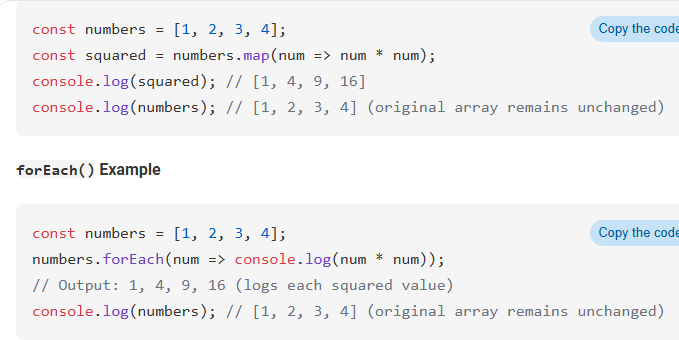 ম্যাপ: একটি নতুন অ্যারে তৈরি করে মূল অ্যারের প্রতিটি উপাদানের উপর একটি কলব্যাক ফাংশন প্রয়োগ করে। এটি ব্যবহৃত হয় যখন আপনি একটি নতুন অ্যারে বানাতে চান যা পূর্বের অ্যারে থেকে পরিবর্তিত বা প্রাপ্ত হয়।
ফরইচ: অ্যারের প্রতিটি উপাদানের জন্য একটি কলব্যাক ফাংশন সম্পাদন করে কিন্তু নতুন একটি অ্যারে ফিরিয়ে দেয় না। এটি সাধারণত সাইড ইফেক্ট (যেমন, লগ করা, ভেরিয়েবল আপডেট করা) সম্পাদনের জন্য ব্যবহৃত হয়।
ম্যাপ: একটি নতুন অ্যারে তৈরি করে মূল অ্যারের প্রতিটি উপাদানের উপর একটি কলব্যাক ফাংশন প্রয়োগ করে। এটি ব্যবহৃত হয় যখন আপনি একটি নতুন অ্যারে বানাতে চান যা পূর্বের অ্যারে থেকে পরিবর্তিত বা প্রাপ্ত হয়। ফরইচ: অ্যারের প্রতিটি উপাদানের জন্য একটি কলব্যাক ফাংশন সম্পাদন করে কিন্তু নতুন একটি অ্যারে ফিরিয়ে দেয় না। এটি সাধারণত সাইড ইফেক্ট (যেমন, লগ করা, ভেরিয়েবল আপডেট করা) সম্পাদনের জন্য ব্যবহৃত হয়।
A function in JavaScript is a reusable block of code that performs a specific task. It takes inputs (parameters), processes them, and can return an output. Functions help avoid code repetition and make programs more organized.
জাভাস্ক্রিপ্টে ফাংশন হলো কোডের একটি পুনরায় ব্যবহারযোগ্য ব্লক যা একটি নির্দিষ্ট কাজ করে। এটি ইনপুট (প্যারামিটার) নেয়, প্রসেস করে এবং আউটপুট দিতে পারে। ফাংশন কোডের পুনরাবৃত্তি রোধ করে এবং প্রোগ্রামকে সংগঠিত করে।
জাভাস্ক্রিপ্টে ফাংশন হলো কোডের একটি পুনরায় ব্যবহারযোগ্য ব্লক যা একটি নির্দিষ্ট কাজ করে। এটি ইনপুট (প্যারামিটার) নেয়, প্রসেস করে এবং আউটপুট দিতে পারে। ফাংশন কোডের পুনরাবৃত্তি রোধ করে এবং প্রোগ্রামকে সংগঠিত করে।
In JavaScript, there are two main ways to define a function:
🔹 1. Function Declaration
* Starts with the `function` keyword
* The function has a name
* It is hoisted, meaning you can call it before it is defined
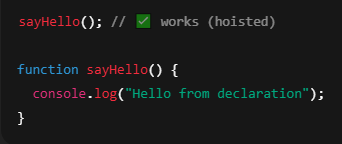 🔹 2. Function Expression
* A function assigned to a variable
* Can be named or anonymous
* Not hoisted, so you must define it before calling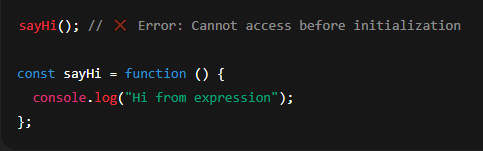 JavaScript-এ ফাংশন লেখার দুইটি প্রধান পদ্ধতি আছে:
🔹 ১. Function Declaration
* `function` কীওয়ার্ড দিয়ে শুরু হয়
* ফাংশনের নাম থাকে
* এটি hoisted হয়, অর্থাৎ আগে কল করলেও চলে
🔹 ২. Function Expression
* একটি ফাংশনকে ভ্যারিয়েবলে অ্যাসাইন করা হয়
* এটি নেইমড বা অ্যানোনিমাস হতে পারে
* এটি hoist হয় না, অর্থাৎ আগে কল করলে এরর হবে
🔹 1. Function Declaration
* Starts with the `function` keyword
* The function has a name
* It is hoisted, meaning you can call it before it is defined
🔹 2. Function Expression* A function assigned to a variable
* Can be named or anonymous
* Not hoisted, so you must define it before calling
JavaScript-এ ফাংশন লেখার দুইটি প্রধান পদ্ধতি আছে:🔹 ১. Function Declaration
* `function` কীওয়ার্ড দিয়ে শুরু হয়
* ফাংশনের নাম থাকে
* এটি hoisted হয়, অর্থাৎ আগে কল করলেও চলে
🔹 ২. Function Expression
* একটি ফাংশনকে ভ্যারিয়েবলে অ্যাসাইন করা হয়
* এটি নেইমড বা অ্যানোনিমাস হতে পারে
* এটি hoist হয় না, অর্থাৎ আগে কল করলে এরর হবে
`break` and `continue` are two control statements used in loops (`for`, `while`, etc.) to control how the loop runs.
🔹 1. `break` Statement
* `break` is used to immediately exit the loop
* The loop stops running as soon as `break` is called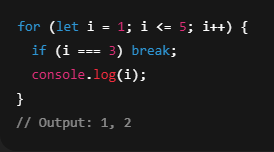 🔹 2. `continue` Statement
* `continue` is used to skip the current iteration and move to the next one
* The loop does not stop, it just skips the rest of the code for that iteration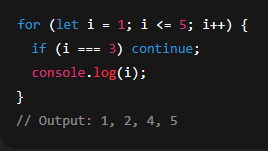 `break` এবং `continue` হলো loop control statements, যেগুলো দিয়ে আপনি loop এর flow নিয়ন্ত্রণ করতে পারেন (`for`, `while`, ইত্যাদিতে)।
🔹 ১. `break` স্টেটমেন্ট
* `break` ব্যবহার করলে পুরো loop থেমে যায়
* যখন শর্ত পূরণ হয়, তখনই loop থেকে বেরিয়ে যায়
🔹 ২. `continue` স্টেটমেন্ট
* `continue` ব্যবহার করলে সেই iteration স্কিপ হয়
* লুপ চলতে থাকে, শুধু ওইবারের কোড আর চলে না
🔹 1. `break` Statement
* `break` is used to immediately exit the loop
* The loop stops running as soon as `break` is called
🔹 2. `continue` Statement* `continue` is used to skip the current iteration and move to the next one
* The loop does not stop, it just skips the rest of the code for that iteration
`break` এবং `continue` হলো loop control statements, যেগুলো দিয়ে আপনি loop এর flow নিয়ন্ত্রণ করতে পারেন (`for`, `while`, ইত্যাদিতে)।🔹 ১. `break` স্টেটমেন্ট
* `break` ব্যবহার করলে পুরো loop থেমে যায়
* যখন শর্ত পূরণ হয়, তখনই loop থেকে বেরিয়ে যায়
🔹 ২. `continue` স্টেটমেন্ট
* `continue` ব্যবহার করলে সেই iteration স্কিপ হয়
* লুপ চলতে থাকে, শুধু ওইবারের কোড আর চলে না
A global variable is a variable that is defined outside of all functions or blocks in a program and can be accessed or modified from anywhere in the code.
গ্লোবাল ভেরিয়েবল হল এমন একটি ভেরিয়েবল যা কোনো ফাংশন বা ব্লকের ভিতরে না থেকে বাইরে ডিফাইন করা হয়, এবং প্রোগ্রামের যেকোনো জায়গা থেকে এটিকে অ্যাকসেস বা পরিবর্তন করা যায়।
গ্লোবাল ভেরিয়েবল হল এমন একটি ভেরিয়েবল যা কোনো ফাংশন বা ব্লকের ভিতরে না থেকে বাইরে ডিফাইন করা হয়, এবং প্রোগ্রামের যেকোনো জায়গা থেকে এটিকে অ্যাকসেস বা পরিবর্তন করা যায়।
In JavaScript, some operations (like API calls, file loading, timers) are asynchronous, meaning they take time and don’t stop the rest of the code from running.
To handle these delays properly, JavaScript provides 3 main ways:
🔹 1. Callback Functions
* A function passed as a parameter and called after the task is finished
* Can lead to callback hell (nested callbacks)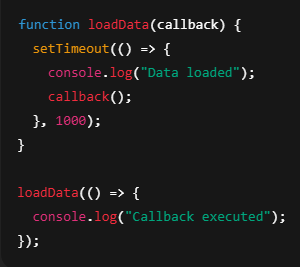 🔹 2. Promises
* A cleaner way to handle async code
* Uses `.then()` and `.catch()` for success and error handling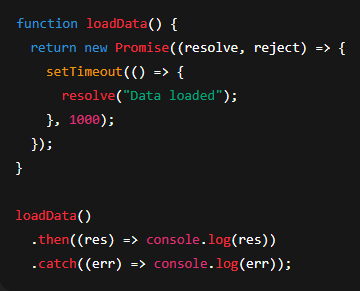 🔹 3. Async/Await
* Modern, simple, and cleaner syntax
* Looks like regular code but handles async under the hood
* Must be used inside an `async` function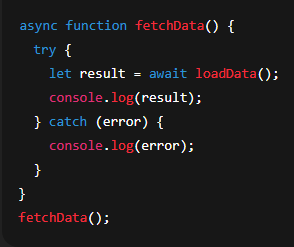 🔹 Key Points:
* Use callbacks for basic async control
* Use promises for better readability
* Use async/await for clean, readable, and modern code
* Always handle errors using `try/catch` or `.catch()`
JavaScript-এ কিছু কাজ (যেমন API call, ফাইল লোড, টাইমার) সময় নেয়, কিন্তু এই সময়ের জন্য বাকি কোড থেমে থাকে না — একে বলে asynchronous behavior।
এই ধরনের কোড সঠিকভাবে হ্যান্ডল করতে JavaScript এ ৩টি উপায় আছে:
🔹 ১. Callback Function
* একটি ফাংশন, যেটি কাজ শেষে কল করা হয়
* বেশি nested হলে callback hell হয়ে যেতে পারে
🔹 ২. Promises
* asynchronous কাজের ভালো ও পরিষ্কার উপায়
* `.then()` এবং `.catch()` ব্যবহার করে রেজাল্ট ও এরর হ্যান্ডল করা হয়
🔹 ৩. Async/Await
* সবচেয়ে আধুনিক এবং সহজ পদ্ধতি
* দেখতে সাধারণ কোডের মতো, কিন্তু ভিতরে async কাজ করে
* `async` ফাংশনের ভিতরে ব্যবহার করতে হয়
🔹 মূল পয়েন্টসমূহ:
* Callback সহজ কিন্তু কোড জটিল হতে পারে
* Promise পরিষ্কার ও ব্যবস্থাপনাযোগ্য
* Async/Await সবচেয়ে ক্লিন এবং আধুনিক পদ্ধতি
* এরর হ্যান্ডল করার জন্য `try/catch` বা `.catch()` ব্যবহার করা উচিত।
To handle these delays properly, JavaScript provides 3 main ways:
🔹 1. Callback Functions
* A function passed as a parameter and called after the task is finished
* Can lead to callback hell (nested callbacks)
🔹 2. Promises* A cleaner way to handle async code
* Uses `.then()` and `.catch()` for success and error handling
🔹 3. Async/Await* Modern, simple, and cleaner syntax
* Looks like regular code but handles async under the hood
* Must be used inside an `async` function
🔹 Key Points:* Use callbacks for basic async control
* Use promises for better readability
* Use async/await for clean, readable, and modern code
* Always handle errors using `try/catch` or `.catch()`
JavaScript-এ কিছু কাজ (যেমন API call, ফাইল লোড, টাইমার) সময় নেয়, কিন্তু এই সময়ের জন্য বাকি কোড থেমে থাকে না — একে বলে asynchronous behavior।
এই ধরনের কোড সঠিকভাবে হ্যান্ডল করতে JavaScript এ ৩টি উপায় আছে:
🔹 ১. Callback Function
* একটি ফাংশন, যেটি কাজ শেষে কল করা হয়
* বেশি nested হলে callback hell হয়ে যেতে পারে
🔹 ২. Promises
* asynchronous কাজের ভালো ও পরিষ্কার উপায়
* `.then()` এবং `.catch()` ব্যবহার করে রেজাল্ট ও এরর হ্যান্ডল করা হয়
🔹 ৩. Async/Await
* সবচেয়ে আধুনিক এবং সহজ পদ্ধতি
* দেখতে সাধারণ কোডের মতো, কিন্তু ভিতরে async কাজ করে
* `async` ফাংশনের ভিতরে ব্যবহার করতে হয়
🔹 মূল পয়েন্টসমূহ:
* Callback সহজ কিন্তু কোড জটিল হতে পারে
* Promise পরিষ্কার ও ব্যবস্থাপনাযোগ্য
* Async/Await সবচেয়ে ক্লিন এবং আধুনিক পদ্ধতি
* এরর হ্যান্ডল করার জন্য `try/catch` বা `.catch()` ব্যবহার করা উচিত।
Many people confuse parameters and arguments, but they are not the same.
🔹 Parameter:
* A variable listed in the function definition
* It acts as a placeholder to receive values
* A value passed to the function when it is called
* The value that replaces the parameter
✅ Example:
greet("Jumman");
Here, "Jumman" is an argument
অনেকেই parameter এবং argument গুলিয়ে ফেলে, কিন্তু এরা এক নয়।
🔹 Parameter (প্যারামিটার):
* এটি একটি ভ্যারিয়েবল, যা ফাংশন ডিক্লেয়ার করার সময় ব্যবহার করা হয়
* এটি ভ্যালু গ্রহণ করার জায়গা হিসেবে কাজ করে
🔹 Argument (আর্গুমেন্ট):
* এটি একটি value, যা ফাংশন কল করার সময় পাঠানো হয়
* এটি parameter-এর জায়গায় বসে কাজ করে
🔹 Parameter:
* A variable listed in the function definition
* It acts as a placeholder to receive values
✅ Example:
function greet(name) {
  console.log("Hello, " + name);
}
// Here, name is a parameter
🔹 Argument:* A value passed to the function when it is called
* The value that replaces the parameter
✅ Example:
greet("Jumman");
Here, "Jumman" is an argument
অনেকেই parameter এবং argument গুলিয়ে ফেলে, কিন্তু এরা এক নয়।
🔹 Parameter (প্যারামিটার):
* এটি একটি ভ্যারিয়েবল, যা ফাংশন ডিক্লেয়ার করার সময় ব্যবহার করা হয়
* এটি ভ্যালু গ্রহণ করার জায়গা হিসেবে কাজ করে
🔹 Argument (আর্গুমেন্ট):
* এটি একটি value, যা ফাংশন কল করার সময় পাঠানো হয়
* এটি parameter-এর জায়গায় বসে কাজ করে
Object-Oriented Programming (OOP) is a way of writing code where we organize it into objects — just like real-world things (car, user, product).
Each object has:
* Properties (data)
* Methods (functions)
It helps to structure big programs, reuse code, and keep everything organized and manageable.
🔹 Main Concepts of OOP (4 Pillars):
1. Encapsulation – Group data and functions together
* Keep related things inside one object/class
* Hide internal details from outside
✅ Example: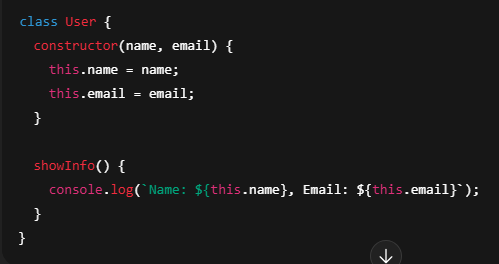 2. Inheritance – Reuse code from other classes
* One class can inherit properties and methods from another
✅ Example: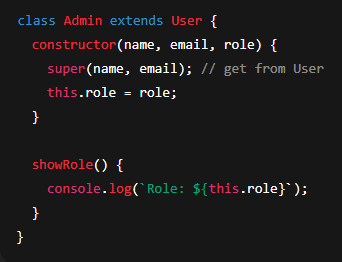 3. Polymorphism – Same method name, different behavior
* One method works differently based on the object/class
✅ Example: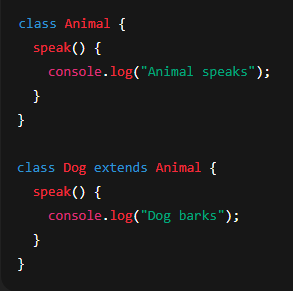 4. Abstraction – Show only what is needed
* Hide complex parts, show only necessary details
* Keeps code clean and secure
✅ Example: You may call `user.login()`, but you don’t need to know how login works inside.
🔹 Why Use OOP in JavaScript?
* Organizes code better
* Reuse code using classes
* Makes code easier to test and debug
* Great for real-world applications like e-commerce, chat apps, etc.
🔹 Real-Life Analogy:
Think of a Car as an object:
* Properties → color, brand, model
* Methods → start(), drive(), stop()
🔹 ES6 Class Syntax Example: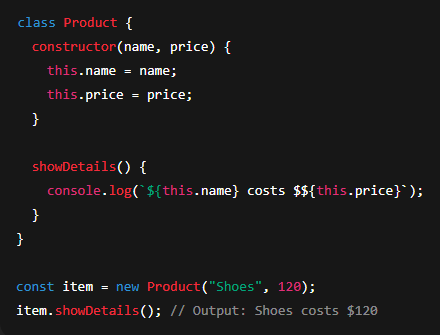
Object-Oriented Programming (OOP) হলো প্রোগ্রাম লেখার একটি পদ্ধতি, যেখানে কোডগুলোকে অবজেক্ট (object) আকারে গঠিত করা হয়।
প্রতিটি অবজেক্টের দুটি জিনিস থাকে:
* প্রপার্টি (property) → ডেটা বা বৈশিষ্ট্য
* মেথড (method) → ফাংশন বা কাজ করার ক্ষমতা
OOP ব্যবহারে বড় বড় প্রজেক্ট গুছিয়ে লেখা যায়, কোড বারবার ব্যবহার করা যায়, ও ভুল খুঁজে বের করাও সহজ হয়।
🔹 OOP-এর ৪টি মূল ভিত্তি (4 Pillars):
# ১. Encapsulation (সংবরণ/আবরণ)
* ডেটা এবং ফাংশনকে একসাথে একটি অবজেক্ট বা ক্লাসে গুচিয়ে রাখা
* বাইরের অংশ থেকে কিছু অংশ লুকিয়ে রাখা যায়
# ২. Inheritance (উত্তরাধিকার)
* একটি ক্লাস অন্য একটি ক্লাসের প্রপার্টি এবং মেথড ব্যবহার করতে পারে
* কোড পুনরায় ব্যবহার করা যায়
# ৩. Polymorphism (বহুরুপিতা)
* একই নামের মেথড, কিন্তু বিভিন্ন ক্লাসে ভিন্নভাবে কাজ করে
# ৪. Abstraction (নির্যাস/সারাংশ উপস্থাপন)
* জটিল বিষয়গুলো লুকিয়ে রেখে শুধু প্রয়োজনীয় অংশ দেখানো
* কোডকে পরিষ্কার ও সিকিউর রাখা যায়
🔹 JavaScript-এ OOP কেন ব্যবহার করবেন?
* বড় প্রজেক্ট গুছিয়ে তৈরি করা যায়
* কোড বারবার ব্যবহার করা যায় (reuse)
* টেস্ট ও ডিবাগ করা সহজ হয়
* E-commerce, Chat App, Inventory System এর মতো বাস্তব প্রজেক্টে উপকারী
🔹 বাস্তব জীবনের উদাহরণ:
Car (গাড়ি) → একটি অবজেক্ট
* প্রপার্টি → color, brand, model
* মেথড → start(), drive(), stop()
Each object has:
* Properties (data)
* Methods (functions)
It helps to structure big programs, reuse code, and keep everything organized and manageable.
🔹 Main Concepts of OOP (4 Pillars):
1. Encapsulation – Group data and functions together
* Keep related things inside one object/class
* Hide internal details from outside
✅ Example:
2. Inheritance – Reuse code from other classes* One class can inherit properties and methods from another
✅ Example:
3. Polymorphism – Same method name, different behavior* One method works differently based on the object/class
✅ Example:
4. Abstraction – Show only what is needed* Hide complex parts, show only necessary details
* Keeps code clean and secure
✅ Example: You may call `user.login()`, but you don’t need to know how login works inside.
🔹 Why Use OOP in JavaScript?
* Organizes code better
* Reuse code using classes
* Makes code easier to test and debug
* Great for real-world applications like e-commerce, chat apps, etc.
🔹 Real-Life Analogy:
Think of a Car as an object:
* Properties → color, brand, model
* Methods → start(), drive(), stop()
🔹 ES6 Class Syntax Example:
Object-Oriented Programming (OOP) হলো প্রোগ্রাম লেখার একটি পদ্ধতি, যেখানে কোডগুলোকে অবজেক্ট (object) আকারে গঠিত করা হয়।
প্রতিটি অবজেক্টের দুটি জিনিস থাকে:
* প্রপার্টি (property) → ডেটা বা বৈশিষ্ট্য
* মেথড (method) → ফাংশন বা কাজ করার ক্ষমতা
OOP ব্যবহারে বড় বড় প্রজেক্ট গুছিয়ে লেখা যায়, কোড বারবার ব্যবহার করা যায়, ও ভুল খুঁজে বের করাও সহজ হয়।
🔹 OOP-এর ৪টি মূল ভিত্তি (4 Pillars):
# ১. Encapsulation (সংবরণ/আবরণ)
* ডেটা এবং ফাংশনকে একসাথে একটি অবজেক্ট বা ক্লাসে গুচিয়ে রাখা
* বাইরের অংশ থেকে কিছু অংশ লুকিয়ে রাখা যায়
# ২. Inheritance (উত্তরাধিকার)
* একটি ক্লাস অন্য একটি ক্লাসের প্রপার্টি এবং মেথড ব্যবহার করতে পারে
* কোড পুনরায় ব্যবহার করা যায়
# ৩. Polymorphism (বহুরুপিতা)
* একই নামের মেথড, কিন্তু বিভিন্ন ক্লাসে ভিন্নভাবে কাজ করে
# ৪. Abstraction (নির্যাস/সারাংশ উপস্থাপন)
* জটিল বিষয়গুলো লুকিয়ে রেখে শুধু প্রয়োজনীয় অংশ দেখানো
* কোডকে পরিষ্কার ও সিকিউর রাখা যায়
🔹 JavaScript-এ OOP কেন ব্যবহার করবেন?
* বড় প্রজেক্ট গুছিয়ে তৈরি করা যায়
* কোড বারবার ব্যবহার করা যায় (reuse)
* টেস্ট ও ডিবাগ করা সহজ হয়
* E-commerce, Chat App, Inventory System এর মতো বাস্তব প্রজেক্টে উপকারী
🔹 বাস্তব জীবনের উদাহরণ:
Car (গাড়ি) → একটি অবজেক্ট
* প্রপার্টি → color, brand, model
* মেথড → start(), drive(), stop()